

Requirements
- The compileSdk version should be 35.
- The minimum SDK version supported by the SDK is 21.
Overview
OTPless SDK accepts the user’s identity (phone number or email), authenticates through multiple channels, and returns a secure token upon success.The merchant app sends this token to its backend, which verifies it with the OTPless Server before proceeding with the user journey.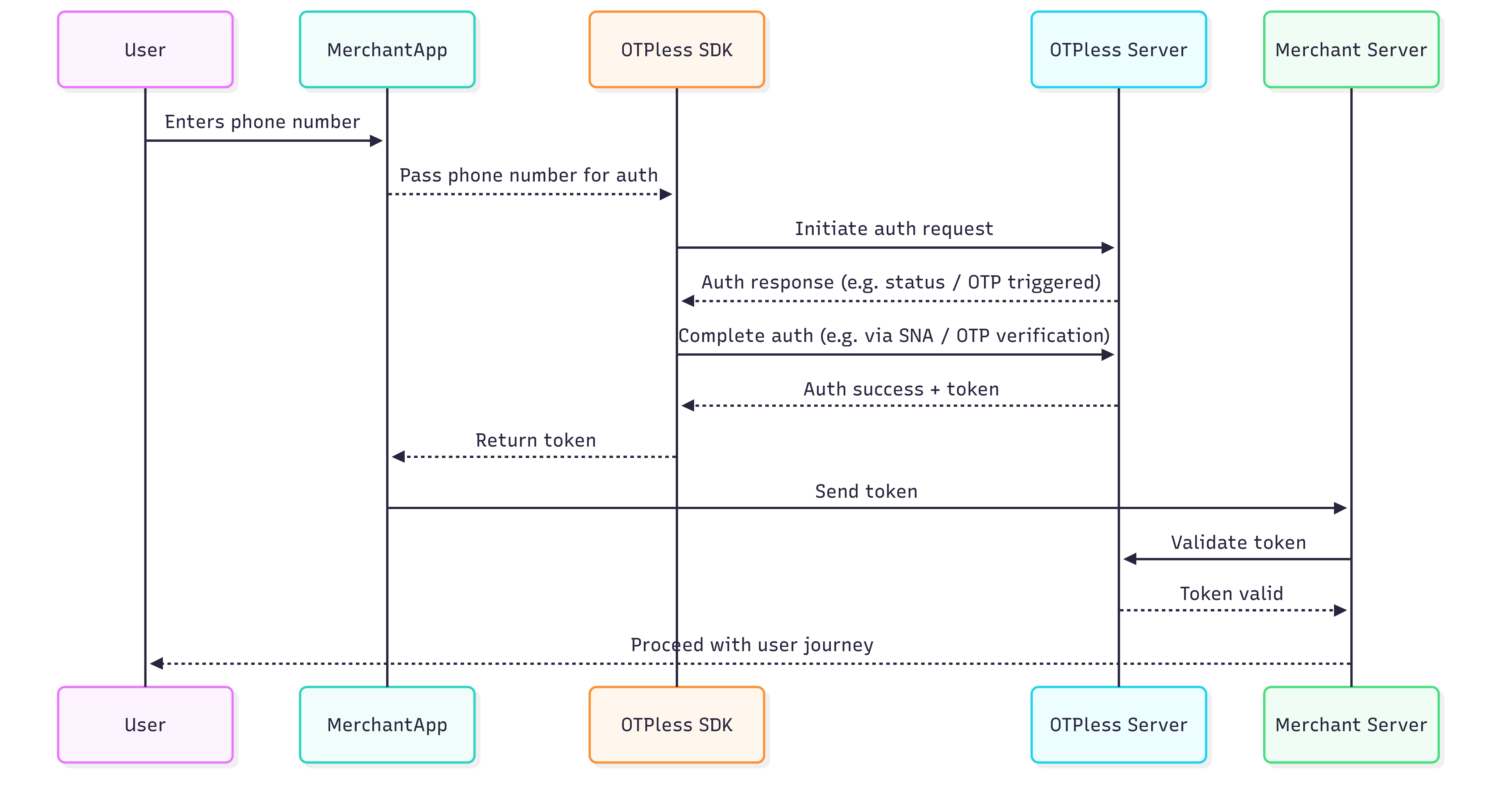
Integration Steps
Step 1: Add SDK Dependency
Add the following dependency in your app’sbuild.gradle.
Step 2: Update AndroidManifest.xml
Add this intent filter to your LoginActivity inAndroidManifest.xml:
🔍 Example: If your App ID is “AcmeApp123”, scheme becomes otpless.acmeapp123
Additionally, ensure your activity is set to singleTop launch mode and that the exported attribute is true:
Silent Network Authentication (SNA) Setup
- Make sure that Silent Network Authentication is enabled on the OTPLESS dashboard.
- Once you have successfully integrated OTPLESS Android SDK in your application, you only have to add the following line in your app’s
AndroidManifestfile in the<application>tag:
Step 3: Configure your SignIn/SignUp Activity
Import theOtplessController class
Kotlin
otplessController member in your SignIn/SignUpActivity
Kotlin
onCreate of your SignIn/SignUpActivity, initialize the otplessController and register the callback response method.
On initialization is success callback is given in callback method.
Kotlin
SignIn/SignUpActivity onNewIntent and forward the new Intent to otplessController.
Step 4: Starting otpless
CallstartOtplessWithLoginPage method from otplessController to start otpless login page.
- Start
- Start with Phone
- Start with Email
Kotlin
Step 5: Handle auth response
Extracttoken from authResponse and validate token with backend apis.
Backend documentation
Kotlin
Step 6: Closing otpless
When your login page is closed or login is successful, close theotplessController.
Kotlin
Step 7: Tracking Multiple Events
You can observe all events using:Sample Event JSON Payloads
- ACTION
- CLICK
- LOAD
- INITIATE
- VERIFY_ERROR
- OTP_AUTO_READ
- DELIVERY_STATUS
- FALLBACK_TRIGGERED
Validate ID Token
Learn how to securely `validate ID token` returned by OTPLESS android SDK to ensure the authenticity of sign-in events from your backend server.
Validate Token (Opaque)
Learn how to securely `validate token` returned by OTPLESS android SDK to ensure the authenticity of sign-in events from your backend server.