> ## Documentation Index
> Fetch the complete documentation index at: https://otpless.com/docs/llms.txt
> Use this file to discover all available pages before exploring further.
# Pre-Built UI
> Leverage our Pre-Built UI for rapid integration and customization of authentication flows in your application. This setup allows you to adjust appearance and functionality through the OTPLESS dashboard with minimal coding.
export const SampleGithubContainer = ({platform, href = '/api-reference/endpoint/verifytoken/verify-token-with-secure-data', text = 'authenticity of sign-in'}) => {
let githubLink = "https://github.com";
switch (platform.toLowerCase()) {
case "android":
githubLink = "https://github.com/devbathaniotpless/otpless-androidnative-demo";
break;
case "ios":
githubLink = "https://github.com/devbathaniotpless/otpless-iOS-demo";
break;
case "react native":
githubLink = "https://github.com/devbathaniotpless/otpless-react-native-demo";
break;
case "flutter":
githubLink = "https://github.com/devbathaniotpless/otpless-flutter-demo";
break;
case "ionic":
githubLink = "https://github.com/devbathaniotpless/otpless-ionic-demo";
break;
case "javascript":
githubLink = "https://github.com/devbathaniotpless/otpless-javascript-demo";
break;
case "vue":
githubLink = "https://github.com/devbathaniotpless/otpless-vue-demo";
break;
case "angular":
githubLink = "https://github.com/devbathaniotpless/otpless-angular-demo";
break;
case "wordpress":
githubLink = "https://github.com/devbathaniotpless/otpless-wordpress-demo";
break;
case "shopify":
githubLink = "https://github.com/devbathaniotpless/otpless-shopify-demo";
break;
case "react js":
githubLink = "https://github.com/devbathaniotpless/otpless-reactjs-demo";
break;
default:
githubLink = "https://github.com";
}
return
Learn how to securely `validate ID token` returned by OTPLESS {platform} SDK to ensure the {text} events from your backend server.
Learn how to securely `validate token` returned by OTPLESS {platform} SDK to ensure the {text} events from your backend server.
;
};
# Overview
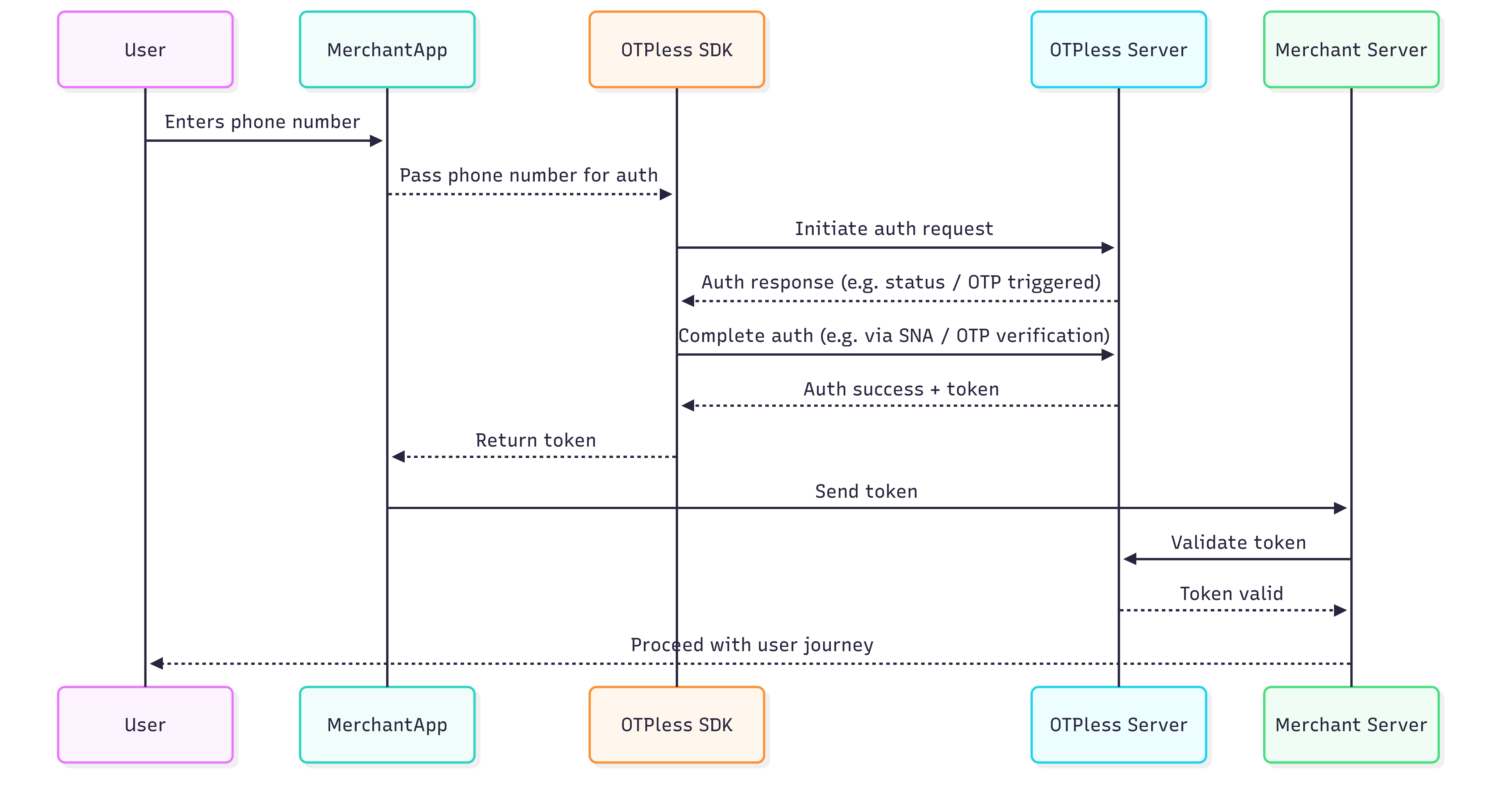
OTPless SDK accepts the user's identity (phone number or email), authenticates through multiple channels, and returns a secure token upon success.The merchant app sends this token to its backend, which verifies it with the OTPless Server before proceeding with the user journey.
 # Integration Steps
## Step 1: SDK Installation
SDK can be installed via both Cocoapods and Swift Package Manager.
Please find the latest version of the SDK [here](https://github.com/otpless-tech/iOS-LP/releases).
### Cocoapods
* Open your app's project file `.xcodeproj`.
* Add the following line into the dependencies section of your project's `Podfile`:
```ruby theme={null}
pod 'OtplessSwiftLP', 'latest_version'
```
Make sure to run the following commands in your root folder to fetch the
dependency.
```bash theme={null}
pod repo update
pod install
```
### Swift Package Manager
1. In Xcode, click File > Swift Packages > Add Package Dependency.
2. In the dialog that appears, enter the repository URL: [https://github.com/otpless-tech/iOS-LP](https://github.com/otpless-tech/iOS-LP).
3. Select the dependency rule as `exact version` and use the **latest version**.
## Step 2: Setup SDK in your App
Add the following keys in your `info.plist` file:
```xml info.plist theme={null}
CFBundleURLTypes
CFBundleURLSchemes
otpless.{{YOUR_APP_ID}}
CFBundleTypeRole
Editor
CFBundleURLName
otpless
LSApplicationQueriesSchemes
whatsapp
otpless
gootpless
com.otpless.ios.app.otpless
googlegmail
```
Import the SDK at the top of your `ViewController.swift`:
```swift theme={null}
import OtplessSwiftLP
```
***
## Step 3: Implement the ConnectResponseDelegate
Your `ViewController` should conform to `ConnectResponseDelegate`:
```swift LoginViewController.swift theme={null}
func onConnectResponse(_ response: [String: Any]) {
if let error = response["error"] as? String {
print("Error: \(error)")
} else if token = response["token"] as? String {
print("Token: \(token)")
// Send this token to your server to validate and get user details.
} else {
// Unknown error occurred
print("Unknown response: \(response)")
}
}
```
***
## Step 4: Initialize the SDK, Set Delegate and Start
Set the response delegate and optionally enable socket logging:
```swift LoginViewController.swift theme={null}
override func viewDidLoad() {
super.viewDidLoad()
OtplessSwiftLP.shared.setResponseDelegate(self)
// Initialize SDK
OtplessSwiftLP.shared.initialize(appId: "YOUR_APP_ID", secret: "YOUR_SECRET")
}
```
To start the authentication process, use:
```swift LoginViewController.swift theme={null}
func start() {
OtplessSwiftLP.shared.start(vc: self)
}
```
***
## Step 5: Stop the process
When your login page is closed or login is successful, stop the Otpless' authentication process:
```swift LoginViewController.swift theme={null}
OtplessSwiftLP.shared.cease()
```
**Make sure that `initialize()` is called again if you call `cease()`.**
***
Select from a wide array of auth methods, including SMS, WhatsApp, Email,
Google, and many more
Customize logos, headings, color schemes, and more to match your brand
identity and improve UX.
# Integration Steps
## Step 1: SDK Installation
SDK can be installed via both Cocoapods and Swift Package Manager.
Please find the latest version of the SDK [here](https://github.com/otpless-tech/iOS-LP/releases).
### Cocoapods
* Open your app's project file `.xcodeproj`.
* Add the following line into the dependencies section of your project's `Podfile`:
```ruby theme={null}
pod 'OtplessSwiftLP', 'latest_version'
```
Make sure to run the following commands in your root folder to fetch the
dependency.
```bash theme={null}
pod repo update
pod install
```
### Swift Package Manager
1. In Xcode, click File > Swift Packages > Add Package Dependency.
2. In the dialog that appears, enter the repository URL: [https://github.com/otpless-tech/iOS-LP](https://github.com/otpless-tech/iOS-LP).
3. Select the dependency rule as `exact version` and use the **latest version**.
## Step 2: Setup SDK in your App
Add the following keys in your `info.plist` file:
```xml info.plist theme={null}
CFBundleURLTypes
CFBundleURLSchemes
otpless.{{YOUR_APP_ID}}
CFBundleTypeRole
Editor
CFBundleURLName
otpless
LSApplicationQueriesSchemes
whatsapp
otpless
gootpless
com.otpless.ios.app.otpless
googlegmail
```
Import the SDK at the top of your `ViewController.swift`:
```swift theme={null}
import OtplessSwiftLP
```
***
## Step 3: Implement the ConnectResponseDelegate
Your `ViewController` should conform to `ConnectResponseDelegate`:
```swift LoginViewController.swift theme={null}
func onConnectResponse(_ response: [String: Any]) {
if let error = response["error"] as? String {
print("Error: \(error)")
} else if token = response["token"] as? String {
print("Token: \(token)")
// Send this token to your server to validate and get user details.
} else {
// Unknown error occurred
print("Unknown response: \(response)")
}
}
```
***
## Step 4: Initialize the SDK, Set Delegate and Start
Set the response delegate and optionally enable socket logging:
```swift LoginViewController.swift theme={null}
override func viewDidLoad() {
super.viewDidLoad()
OtplessSwiftLP.shared.setResponseDelegate(self)
// Initialize SDK
OtplessSwiftLP.shared.initialize(appId: "YOUR_APP_ID", secret: "YOUR_SECRET")
}
```
To start the authentication process, use:
```swift LoginViewController.swift theme={null}
func start() {
OtplessSwiftLP.shared.start(vc: self)
}
```
***
## Step 5: Stop the process
When your login page is closed or login is successful, stop the Otpless' authentication process:
```swift LoginViewController.swift theme={null}
OtplessSwiftLP.shared.cease()
```
**Make sure that `initialize()` is called again if you call `cease()`.**
***
Select from a wide array of auth methods, including SMS, WhatsApp, Email,
Google, and many more
Customize logos, headings, color schemes, and more to match your brand
identity and improve UX.