> ## Documentation Index
> Fetch the complete documentation index at: https://otpless.com/docs/llms.txt
> Use this file to discover all available pages before exploring further.
# Headless
> Utilize our Headless SDK for ultimate flexibility. This guide provides detailed instructions on integrating custom UI elements with OTPLESS's backend authentication functions.
export const SampleGithubContainer = ({platform, href = '/api-reference/endpoint/verifytoken/verify-token-with-secure-data', text = 'authenticity of sign-in'}) => {
let githubLink = "https://github.com";
switch (platform.toLowerCase()) {
case "android":
githubLink = "https://github.com/devbathaniotpless/otpless-androidnative-demo";
break;
case "ios":
githubLink = "https://github.com/devbathaniotpless/otpless-iOS-demo";
break;
case "react native":
githubLink = "https://github.com/devbathaniotpless/otpless-react-native-demo";
break;
case "flutter":
githubLink = "https://github.com/devbathaniotpless/otpless-flutter-demo";
break;
case "ionic":
githubLink = "https://github.com/devbathaniotpless/otpless-ionic-demo";
break;
case "javascript":
githubLink = "https://github.com/devbathaniotpless/otpless-javascript-demo";
break;
case "vue":
githubLink = "https://github.com/devbathaniotpless/otpless-vue-demo";
break;
case "angular":
githubLink = "https://github.com/devbathaniotpless/otpless-angular-demo";
break;
case "wordpress":
githubLink = "https://github.com/devbathaniotpless/otpless-wordpress-demo";
break;
case "shopify":
githubLink = "https://github.com/devbathaniotpless/otpless-shopify-demo";
break;
case "react js":
githubLink = "https://github.com/devbathaniotpless/otpless-reactjs-demo";
break;
default:
githubLink = "https://github.com";
}
return
Learn how to securely `validate ID token` returned by OTPLESS {platform} SDK to ensure the {text} events from your backend server.
Learn how to securely `validate token` returned by OTPLESS {platform} SDK to ensure the {text} events from your backend server.
;
};
This is the new Headless authentication SDK that is significantly faster and more robust than the previous version. This upgrade enhances **performance**, **reliability**, and **security**, ensuring a seamless authentication experience, along with a seamless integration process. We strongly recommend migrating to the new SDK for improved efficiency and better support. To migrate from the old SDK, remove the previous SDK dependency and integration and follow the below mentioned steps.
# Overview
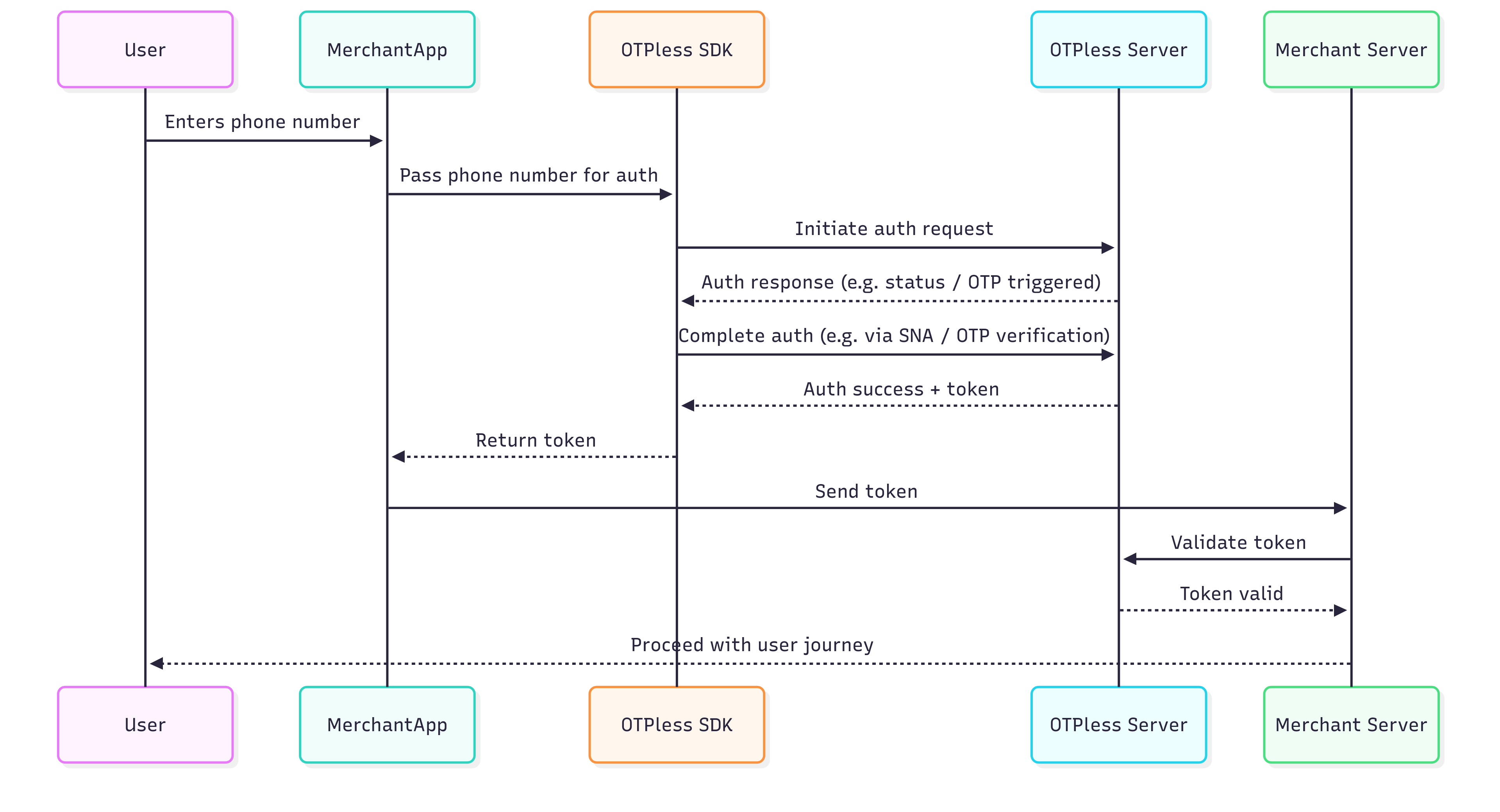
OTPless SDK accepts the user's identity (phone number or email), authenticates through multiple channels, and returns a secure token upon success.The merchant app sends this token to its backend, which verifies it with the OTPless Server before proceeding with the user journey.
 # Integration Steps
## Step 1: Installation
Add the following to your `pubspec.yaml`:
```yaml theme={null}
dependencies:
otpless_headless_flutter: ^
```
Then, run:
```bash theme={null}
flutter pub get
```
Please find the latest version of the SDK [here](https://pub.dev/packages/otpless_headless_flutter).
## Step 2: Platform-specific Integrations
1. Add intent filter inside your `android/app/src/main/AndroidManifest.xml` file into your Main activity code block:
This step is only needed for Magic Link. Smart Auth integration do not require this step.
```xml theme={null}
```
Replace `YOUR_APP_ID` with [your actual App
ID](https://otpless.com/dashboard/customer/dev-settings/apiKeys) provided in
your OTPLESS dashboard.
2. Add Network Security Config inside your `android/app/src/main/AndroidManifest.xml` file into your `` code block (Only required if you are using the SNA feature):
```xml theme={null}
android:networkSecurityConfig="@xml/otpless_network_security_config"
```
3. Change your activity launchMode to singleTop and exported true for your Main Activity:
This step is only needed for Magic Link. Smart Auth integration do not require this step.
```xml theme={null}
android:launchMode="singleTop"
android:exported="true"
```
4. If your MainActivity extends `FlutterActivity`, change it to extend `FlutterFragmentActivity` for lifecycle awareness.
```kotlin theme={null}
import io.flutter.embedding.android.FlutterFragmentActivity
class MainActivity : FlutterFragmentActivity() {
}
```
1. Go to your project's root folder in the terminal and run.
```bash theme={null}
pod install
```
2. Add the following block to your `ios/Runner/Info.plist` file:
This step is only needed for Magic Link. Smart Auth integration do not require this step.
```xml info.plist theme={null}
CFBundleURLTypes
CFBundleURLSchemes
otpless.YOUR_APP_ID_LOWERCASE
CFBundleTypeRole
Editor
CFBundleURLName
otpless
LSApplicationQueriesSchemes
whatsapp
otpless
gootpless
com.otpless.ios.app.otpless
googlegmail
```
Replace `YOUR_APP_ID` with [your actual App
ID](https://otpless.com/dashboard/customer/dev-settings/apiKeys) provided in
your OTPLESS dashboard.
3. Add the following block to your `ios/Runner/Info.plist` file only if you are using the SNA feature.
* If the `NSAppTransportSecurity` key is not already present, add the entire block below.
* If the `NSAppTransportSecurity` key is already present, add the listed domains one by one under `NSExceptionDomains`.
```xml info.plist theme={null}
NSAppTransportSecurity
NSExceptionDomains
80.in.safr.sekuramobile.com
NSExceptionAllowsInsecureHTTPLoads
NSIncludesSubdomains
api-csp.airtel.in
NSExceptionAllowsInsecureHTTPLoads
NSIncludesSubdomains
in-vil.ipification.com
NSExceptionAllowsInsecureHTTPLoads
NSIncludesSubdomains
partnerapi.jio.com
NSExceptionAllowsInsecureHTTPLoads
NSIncludesSubdomains
```
4. Import the OTPLESS SDK in your respective `ios/Runner/AppDelegate.swift` file to handle redirection.
This step is only needed for Magic Link. Smart Auth integration do not require this step.
```swift theme={null}
import OtplessBM
```
```swift App Delegate theme={null}
func application(_ app: UIApplication, open url: URL, options: [UIApplication.OpenURLOptionsKey : Any] = [:]) -> Bool {
if Otpless.shared.isOtplessDeeplink(url: url.url) {
Task(priority: .userInitiated) {
await Otpless.shared.handleDeeplink(url.url)
}
}
return true
}
```
```swift Scene Delegate theme={null}
func scene(_ scene: UIScene, openURLContexts URLContexts: Set) {
for context in URLContexts {
if Otpless.shared.isOtplessDeeplink(url: url.url) {
Task(priority: .userInitiated) {
await Otpless.shared.handleDeeplink(url.url)
}
break
}
}
}
```
## Step 3: Initialize the SDK
1. Import the SDK in your `main.dart` file:
```dart theme={null}
import 'package:otpless_headless_flutter/otpless_flutter.dart';
```
2. Then, create an instance of the SDK:
```dart theme={null}
final _otplessHeadlessPlugin = Otpless();
```
3. In your LoginScreen's `initState`, initialize the SDK and set the response callback:
```dart LoginScreen theme={null}
@override
void initState() {
super.initState();
_otplessHeadlessPlugin.initialize("YOUR_APP_ID");
_otplessHeadlessPlugin.setResponseCallback(onOtplessResponse);
}
```
4. Create a callback function to handle the response:
```dart LoginScreen theme={null}
void onOtplessResponse(dynamic result) {
_otplessHeadlessPlugin.commitResponse(result);
final responseType = result['responseType'];
switch (responseType) {
case "SDK_READY":
debugPrint("SDK is ready");
break;
case "FAILED":
debugPrint("SDK initialization failed");
// Handle SDK initialization failure
break;
case "INITIATE":
if (result["statusCode"] == 200) {
debugPrint("Headless authentication initiated");
final authType = result["response"]["authType"]; // This is the authentication type
if (authType == "OTP") {
// Take user to OTP verification screen
} else if (authType == "SILENT_AUTH") {
// Handle Silent Authentication initiation by showing
// loading status for SNA flow.
}
} else {
// Handle initiation error.
// To handle initiation error response, please refer to the error handling section.
if (Platform.isAndroid) {
handleInitiateErrorAndroid(result["response"]);
} else if (Platform.isIOS) {
handleInitiateErrorIOS(result["response"]);
}
}
break;
case "OTP_AUTO_READ":
// OTP_AUTO_READ is triggered only in ANDROID devices for WhatsApp and SMS.
final otp = result["response"]["otp"];
debugPrint("OTP Received: $otp");
break;
case "VERIFY":
final authType = result["response"]["authType"];
if (authType == "SILENT_AUTH") {
if (result["statusCode"] == 9106) {
// Silent Authentication and all fallback authentication methods in SmartAuth have failed.
// The transaction cannot proceed further.
// Handle the scenario to gracefully exit the authentication flow
} else {
// Silent Authentication failed.
// If SmartAuth is enabled, the INITIATE response
// will include the next available authentication method configured in the dashboard.
}
} else {
// To handle verification failed response, please refer to the error handling section.
if (Platform.isAndroid) {
handleVerifyErrorAndroid(result["response"]);
} else if (Platform.isIOS) {
handleVerifyErrorIOS(result["response"]);
}
}
break;
case "DELIVERY_STATUS":
// This function is called when delivery is successful for your authType.
final authType = result["response"]["authType"];
// It is the authentication type (OTP, MAGICLINK, OTP_LINK) for which the delivery status is being sent
final deliveryChannel = result["response"]["deliveryChannel"];
// It is the delivery channel (SMS, WHATSAPP, etc) on which the authType has been delivered
break;
case "ONETAP":
final token = result["response"]["token"];
if (token != null) {
debugPrint("OneTap Data: $token");
// Process token and proceed
}
break;
case "FALLBACK_TRIGGERED":
// A fallback occurs when an OTP delivery attempt on one channel fails,
// and the system automatically retries via the subsequent channel selected on Otpless Dashboard.
// For example, if a merchant opts for SmartAuth with primary channal as WhatsApp and secondary channel as SMS,
// in that case, if OTP delivery on WhatsApp fails, the system will automatically retry via SMS.
// The response will contain the deliveryChannel to which the OTP has been sent.
final newDeliveryChannel = result["response"]["deliveryChannel"];
if (newDeliveryChannel != null) {
// This is the deliveryChannel to which the OTP has been sent
}
break;
default:
debugPrint("Unknown response type: $responseType");
break;
}
}
```
## Response Objects Structure
```json theme={null}
{
"responseType": "SDK_READY",
"statusCode": 200,
"response": {
"success": true
},
}
```
```json theme={null}
{
"responseType": "FAILED",
"statusCode": 5003,
"response": {
"errorCode": "5003",
"errorMessage": "Failed to initialize the SDK"
}
}
```
```json theme={null}
{
"responseType": "INITIATE",
"statusCode": 200,
"response": {
"requestId": "abc123xyz",
"channel": "MOBILE_LOGIN",
"authType": "MOBILE_LOGIN",
"deliveryChannel": "SMS",
}
}
```
```json theme={null}
{
"responseType": "OTP_AUTO_READ",
"statusCode": 200,
"response": {
"otp": "482913"
}
}
```
All VERIFY response types will always return a non-200 status code.
```json theme={null}
{
"responseType": "VERIFY",
"statusCode": 400,
"response": {
"errorCode":"7118",
"errorMessage":"Request error: Incorrect OTP!",
"authType":"OTP"
}
}
```
```json theme={null}
{
"responseType": "ONETAP",
"statusCode": 200,
"response": {
"token": "your_token_here",
"status": "SUCCESS",
"userId": "userId_for_identity",
"timestamp": "2024-07-11T12:51:42Z",
"identities": [],
"idToken": "jwt_token",
"network": {},
"deviceInfo": {},
"sessionInfo": { },
"firebaseInfo": {}
}
}
```
```json theme={null}
{
"responseType": "DELIVERY_STATUS",
"statusCode": 200,
"response": {
"deliveryChannel": "WHATSAPP",
"communicationDelivered": true,
"authType": "OTP"
}
}
```
```json theme={null}
{
"responseType": "FALLBACK_TRIGGERED",
"statusCode": 200,
"response": {
"requestId": "req_98765abc",
"channel": "MOBILE_LOGIN",
"authType": "MOBILE_LOGIN",
"deliveryChannel": "SMS"
}
}
```
## Step 4: Initiate Authentication
Initiate the authentication process based on the user's selected method.
Phone authentication allows users to verify their identity using their phone number. Merchants can choose from various authentication methods:
* **Silent Authentication (SNA)** – Automatically verifies the user without requiring OTP or MAGICLINK.
* **OTP on Desired Channel** – Sends a one-time password (OTP) via SMS, WhatsApp, or another preferred channel.
* **Magic Link** – Sends a link that users can click to authenticate.
* **SNA + OTP** – Uses silent authentication first and falls back to OTP if needed.
* **OTP + Magic Link** – Sends both an OTP and a magic link, allowing users to authenticate via either method.
```dart LoginScreen theme={null}
void startWithPhone(String phoneNumber) async {
final bool isSdkReady = await _otplessHeadlessPlugin.isSdkReady();
if (isSdkReady) {
final Map args = {
"phone": "phoneNumber",
"countryCode": "countryCode",
};
_otplessHeadlessPlugin.start(onOtplessResponse, args);
} else {
// Follow Fallback mechanism to handle the authentication flow.
}
}
```
### Verify OTP
To verify the OTP entered by the user, use the `verify` method with the necessary parameters. Verifying OTP is required only in case of `OTP` authentication. No need to verify `OTP` in case of `MAGICLINK`.
```dart LoginScreen theme={null}
void verifyPhoneOtp(String phoneNumber, String otp) {
final Map args = {
"phone": "phoneNumber",
"countryCode": "countryCode",
"otp": "otp",
};
_otplessHeadlessPlugin.start(onOtplessResponse, args);
}
```
**Email Authentication** 📧\
Email authentication verifies users using their email address. Merchants can choose from:
* **OTP via Email** – Sends a one-time password to the user’s email.
* **Magic Link** – Sends a clickable authentication link to the email.
* **OTP + Magic Link** – Provides both options for flexibility.
```dart LoginScreen theme={null}
void startWithEmail(String email) {
final Map args = {
"email": email,
};
_otplessHeadlessPlugin.start(onOtplessResponse, args);
}
```
### Verify OTP
To verify the OTP entered by the user, use the `verify` method with the necessary parameters. Verifying OTP is required only in case of `OTP` authentication. No need to verify `OTP` in case of `MAGICLINK`.
```dart LoginScreen theme={null}
void verifyEmailOtp(String email, String otp) {
final Map args = {
"email": email,
"otp": otp,
};
_otplessHeadlessPlugin.start(onOtplessResponse, args);
}
```
**OAuth Authentication** 🔑\
OAuth allows users to authenticate using third-party services like Google, GitHub, or WhatsApp. Instead of entering credentials manually, users can log in using their existing accounts, streamlining the authentication process.
This is the list of **channels** you can use for OAuth login:
* WHATSAPP
* APPLE
* GMAIL
* TWITTER
* DISCORD
* SLACK
* FACEBOOK
* LINKEDIN
* MICROSOFT
* LINE
* LINEAR
* NOTION
* TWITCH
* GITHUB
* BITBUCKET
* ATLASSIAN
* GITLAB
```dart LoginScreen theme={null}
void startWithOAuth(String channelType) {
final Map args = {
"channelType": "WHATSAPP", // Replace WHATSAPP with your desired channel
};
_otplessHeadlessPlugin.start(onOtplessResponse, args);
}
```
***
## Error Handling
The error codes for android and iOS have to be handled separately.
* Checkout [android error codes](https://otpless.com/docs/frontend-sdks/app-sdks/android/new/references/error-codes)
* Checkout [iOS error codes](https://otpless.com/docs/frontend-sdks/app-sdks/ios/new/references/error-codes)
* To handle all the **verification/initiation error codes** for android and iOS, refer to the following code:
```dart Initiate Error theme={null}
void handleInitiateErrorAndroid(dynamic response) {
final String? errorCode = response?['errorCode'];
final String? errorMessage = response?['errorMessage'];
if (errorCode == null) {
debugPrint("OTPless Error: Unknown error - $errorMessage");
return;
}
switch (errorCode) {
case "7101":
debugPrint("OTPless Error: Invalid parameters values or missing parameters - $errorMessage");
break;
case "7102":
debugPrint("OTPless Error: Invalid phone number - $errorMessage");
break;
case "7103":
debugPrint("OTPless Error: Invalid phone number delivery channel - $errorMessage");
break;
case "7104":
debugPrint("OTPless Error: Invalid email - $errorMessage");
break;
case "7105":
debugPrint("OTPless Error: Invalid email channel - $errorMessage");
break;
case "7106":
debugPrint("OTPless Error: Invalid phone number or email - $errorMessage");
break;
case "7113":
debugPrint("OTPless Error: Invalid expiry - $errorMessage");
break;
case "7116":
debugPrint("OTPless Error: OTP Length is invalid (4 or 6 only allowed) - $errorMessage");
break;
case "7121":
debugPrint("OTPless Error: Invalid app hash - $errorMessage");
break;
case "4000":
debugPrint("OTPless Error: Invalid request values - $errorMessage");
break;
case "4001":
debugPrint("OTPless Error: Unsupported 2FA request - $errorMessage");
break;
case "4003":
debugPrint("OTPless Error: Incorrect request channel - $errorMessage");
break;
case "401":
case "7025":
debugPrint("OTPless Error: Unauthorized request or country not enabled - $errorMessage");
break;
case "7020":
case "7022":
case "7023":
case "7024":
debugPrint("OTPless Error: Too many requests (rate limiting) - $errorMessage");
break;
case "9100":
case "9104":
case "9103":
debugPrint("OTPless Error: Network connectivity error - $errorMessage");
break;
default:
debugPrint("OTPless Error: Unknown error - $errorMessage");
}
}
```
```dart Verify Error theme={null}
void handleVerifyErrorAndroid(dynamic response) {
final String? errorCode = response?['errorCode'];
final String? errorMessage = response?['errorMessage'];
if (errorCode == null) {
debugPrint("OTPless Error: Unknown error - $errorMessage");
return;
}
switch (errorCode) {
case "7112":
debugPrint("OTPless Error: Empty OTP - $errorMessage");
break;
case "7115":
debugPrint("OTPless Error: OTP is already verified - $errorMessage");
break;
case "7118":
debugPrint("OTPless Error: Incorrect OTP - $errorMessage");
break;
case "7303":
debugPrint("OTPless Error: OTP expired - $errorMessage");
break;
case "4000":
debugPrint("OTPless Error: Invalid request - $errorMessage");
break;
case "9100":
case "9104":
case "9103":
debugPrint("OTPless Error: Network connectivity error - $errorMessage");
break;
default:
debugPrint("OTPless Error: Unknown error - $errorMessage");
}
}
```
```dart Initiate Error theme={null}
void handleInitiateErrorIOS(dynamic response) {
final String? errorCode = response?['errorCode'];
final String? errorMessage = response?['errorMessage'];
if (errorCode == null) {
debugPrint("OTPless Error: Unknown error - ${errorMessage ?? 'Unknown error'}");
return;
}
switch (errorCode) {
case "7101":
debugPrint("OTPless Error: Invalid parameters values or missing parameters - ${errorMessage ?? 'Unknown error'}");
break;
case "7102":
debugPrint("OTPless Error: Invalid phone number - ${errorMessage ?? 'Unknown error'}");
break;
case "7103":
debugPrint("OTPless Error: Invalid phone number delivery channel - ${errorMessage ?? 'Unknown error'}");
break;
case "7104":
debugPrint("OTPless Error: Invalid email - ${errorMessage ?? 'Unknown error'}");
break;
case "7105":
debugPrint("OTPless Error: Invalid email channel - ${errorMessage ?? 'Unknown error'}");
break;
case "7106":
debugPrint("OTPless Error: Invalid phone number or email - ${errorMessage ?? 'Unknown error'}");
break;
case "7113":
debugPrint("OTPless Error: Invalid expiry - ${errorMessage ?? 'Unknown error'}");
break;
case "7116":
debugPrint("OTPless Error: OTP Length is invalid (4 or 6 only allowed) - ${errorMessage ?? 'Unknown error'}");
break;
case "7121":
debugPrint("OTPless Error: Invalid app hash - ${errorMessage ?? 'Unknown error'}");
break;
case "4000":
debugPrint("OTPless Error: Invalid request values - ${errorMessage ?? 'Unknown error'}");
break;
case "4003":
debugPrint("OTPless Error: Incorrect request channel - ${errorMessage ?? 'Unknown error'}");
break;
case "401":
case "7025":
debugPrint("OTPless Error: Unauthorized request or country not enabled - ${errorMessage ?? 'Unknown error'}");
break;
case "7020":
case "7022":
case "7023":
case "7024":
debugPrint("OTPless Error: Rate limiting error (Too many requests) - ${errorMessage ?? 'Unknown error'}");
break;
// iOS feature limitation
case "5900":
debugPrint("OTPless Error: The feature is not supported because it requires a newer iOS version - ${errorMessage ?? 'The requested feature is only available on newer iOS versions.'}");
break;
// Internet-related errors
case "9100":
case "9101":
case "9102":
case "9103":
case "9104":
case "9105":
debugPrint("OTPless Error: Network issue detected - ${errorMessage ?? 'A network error occurred. Please check your internet connection or try again later.'}");
break;
case "9110":
debugPrint("OTPless Error: Otpless Authentication Request Cancelled - ${errorMessage ?? 'The authentication request was manually canceled by the user or the system.'}");
break;
default:
debugPrint("OTPless Error: ${errorMessage ?? 'Unknown error'}");
}
}
```
```dart Verify Error theme={null}
void handleVerifyErrorIOS(dynamic response) {
final String? errorCode = response?['errorCode'];
final String? errorMessage = response?['errorMessage'];
if (errorCode == null) {
debugPrint("OTPless Error: Unknown error - ${errorMessage ?? 'Unknown error'}");
return;
}
switch (errorCode) {
case "7112":
debugPrint("OTPless Error: ${errorMessage ?? 'Unknown error'}");
break;
case "7115":
debugPrint("OTPless Error: ${errorMessage ?? 'Unknown error'}");
break;
case "7118":
debugPrint("OTPless Error: ${errorMessage ?? 'Unknown error'}");
break;
case "7303":
debugPrint("OTPless Error: ${errorMessage ?? 'Unknown error'}");
break;
case "4000":
debugPrint("OTPless Error: ${errorMessage ?? 'Unknown error'}");
break;
// Internet-related errors
case "9100":
case "9101":
case "9102":
case "9103":
case "9104":
case "9105":
debugPrint("OTPless Error: Network issue detected - ${errorMessage ?? 'A network error occurred. Please check your internet connection or try again later.'}");
break;
case "9110":
debugPrint("OTPless Error: Otpless Authentication Request Cancelled - ${errorMessage ?? 'The authentication request was manually canceled by the user or the system.'}");
break;
default:
debugPrint("OTPless Error: ${errorMessage ?? 'Unknown error'}");
}
}
```
# Integration Steps
## Step 1: Installation
Add the following to your `pubspec.yaml`:
```yaml theme={null}
dependencies:
otpless_headless_flutter: ^
```
Then, run:
```bash theme={null}
flutter pub get
```
Please find the latest version of the SDK [here](https://pub.dev/packages/otpless_headless_flutter).
## Step 2: Platform-specific Integrations
1. Add intent filter inside your `android/app/src/main/AndroidManifest.xml` file into your Main activity code block:
This step is only needed for Magic Link. Smart Auth integration do not require this step.
```xml theme={null}
```
Replace `YOUR_APP_ID` with [your actual App
ID](https://otpless.com/dashboard/customer/dev-settings/apiKeys) provided in
your OTPLESS dashboard.
2. Add Network Security Config inside your `android/app/src/main/AndroidManifest.xml` file into your `` code block (Only required if you are using the SNA feature):
```xml theme={null}
android:networkSecurityConfig="@xml/otpless_network_security_config"
```
3. Change your activity launchMode to singleTop and exported true for your Main Activity:
This step is only needed for Magic Link. Smart Auth integration do not require this step.
```xml theme={null}
android:launchMode="singleTop"
android:exported="true"
```
4. If your MainActivity extends `FlutterActivity`, change it to extend `FlutterFragmentActivity` for lifecycle awareness.
```kotlin theme={null}
import io.flutter.embedding.android.FlutterFragmentActivity
class MainActivity : FlutterFragmentActivity() {
}
```
1. Go to your project's root folder in the terminal and run.
```bash theme={null}
pod install
```
2. Add the following block to your `ios/Runner/Info.plist` file:
This step is only needed for Magic Link. Smart Auth integration do not require this step.
```xml info.plist theme={null}
CFBundleURLTypes
CFBundleURLSchemes
otpless.YOUR_APP_ID_LOWERCASE
CFBundleTypeRole
Editor
CFBundleURLName
otpless
LSApplicationQueriesSchemes
whatsapp
otpless
gootpless
com.otpless.ios.app.otpless
googlegmail
```
Replace `YOUR_APP_ID` with [your actual App
ID](https://otpless.com/dashboard/customer/dev-settings/apiKeys) provided in
your OTPLESS dashboard.
3. Add the following block to your `ios/Runner/Info.plist` file only if you are using the SNA feature.
* If the `NSAppTransportSecurity` key is not already present, add the entire block below.
* If the `NSAppTransportSecurity` key is already present, add the listed domains one by one under `NSExceptionDomains`.
```xml info.plist theme={null}
NSAppTransportSecurity
NSExceptionDomains
80.in.safr.sekuramobile.com
NSExceptionAllowsInsecureHTTPLoads
NSIncludesSubdomains
api-csp.airtel.in
NSExceptionAllowsInsecureHTTPLoads
NSIncludesSubdomains
in-vil.ipification.com
NSExceptionAllowsInsecureHTTPLoads
NSIncludesSubdomains
partnerapi.jio.com
NSExceptionAllowsInsecureHTTPLoads
NSIncludesSubdomains
```
4. Import the OTPLESS SDK in your respective `ios/Runner/AppDelegate.swift` file to handle redirection.
This step is only needed for Magic Link. Smart Auth integration do not require this step.
```swift theme={null}
import OtplessBM
```
```swift App Delegate theme={null}
func application(_ app: UIApplication, open url: URL, options: [UIApplication.OpenURLOptionsKey : Any] = [:]) -> Bool {
if Otpless.shared.isOtplessDeeplink(url: url.url) {
Task(priority: .userInitiated) {
await Otpless.shared.handleDeeplink(url.url)
}
}
return true
}
```
```swift Scene Delegate theme={null}
func scene(_ scene: UIScene, openURLContexts URLContexts: Set) {
for context in URLContexts {
if Otpless.shared.isOtplessDeeplink(url: url.url) {
Task(priority: .userInitiated) {
await Otpless.shared.handleDeeplink(url.url)
}
break
}
}
}
```
## Step 3: Initialize the SDK
1. Import the SDK in your `main.dart` file:
```dart theme={null}
import 'package:otpless_headless_flutter/otpless_flutter.dart';
```
2. Then, create an instance of the SDK:
```dart theme={null}
final _otplessHeadlessPlugin = Otpless();
```
3. In your LoginScreen's `initState`, initialize the SDK and set the response callback:
```dart LoginScreen theme={null}
@override
void initState() {
super.initState();
_otplessHeadlessPlugin.initialize("YOUR_APP_ID");
_otplessHeadlessPlugin.setResponseCallback(onOtplessResponse);
}
```
4. Create a callback function to handle the response:
```dart LoginScreen theme={null}
void onOtplessResponse(dynamic result) {
_otplessHeadlessPlugin.commitResponse(result);
final responseType = result['responseType'];
switch (responseType) {
case "SDK_READY":
debugPrint("SDK is ready");
break;
case "FAILED":
debugPrint("SDK initialization failed");
// Handle SDK initialization failure
break;
case "INITIATE":
if (result["statusCode"] == 200) {
debugPrint("Headless authentication initiated");
final authType = result["response"]["authType"]; // This is the authentication type
if (authType == "OTP") {
// Take user to OTP verification screen
} else if (authType == "SILENT_AUTH") {
// Handle Silent Authentication initiation by showing
// loading status for SNA flow.
}
} else {
// Handle initiation error.
// To handle initiation error response, please refer to the error handling section.
if (Platform.isAndroid) {
handleInitiateErrorAndroid(result["response"]);
} else if (Platform.isIOS) {
handleInitiateErrorIOS(result["response"]);
}
}
break;
case "OTP_AUTO_READ":
// OTP_AUTO_READ is triggered only in ANDROID devices for WhatsApp and SMS.
final otp = result["response"]["otp"];
debugPrint("OTP Received: $otp");
break;
case "VERIFY":
final authType = result["response"]["authType"];
if (authType == "SILENT_AUTH") {
if (result["statusCode"] == 9106) {
// Silent Authentication and all fallback authentication methods in SmartAuth have failed.
// The transaction cannot proceed further.
// Handle the scenario to gracefully exit the authentication flow
} else {
// Silent Authentication failed.
// If SmartAuth is enabled, the INITIATE response
// will include the next available authentication method configured in the dashboard.
}
} else {
// To handle verification failed response, please refer to the error handling section.
if (Platform.isAndroid) {
handleVerifyErrorAndroid(result["response"]);
} else if (Platform.isIOS) {
handleVerifyErrorIOS(result["response"]);
}
}
break;
case "DELIVERY_STATUS":
// This function is called when delivery is successful for your authType.
final authType = result["response"]["authType"];
// It is the authentication type (OTP, MAGICLINK, OTP_LINK) for which the delivery status is being sent
final deliveryChannel = result["response"]["deliveryChannel"];
// It is the delivery channel (SMS, WHATSAPP, etc) on which the authType has been delivered
break;
case "ONETAP":
final token = result["response"]["token"];
if (token != null) {
debugPrint("OneTap Data: $token");
// Process token and proceed
}
break;
case "FALLBACK_TRIGGERED":
// A fallback occurs when an OTP delivery attempt on one channel fails,
// and the system automatically retries via the subsequent channel selected on Otpless Dashboard.
// For example, if a merchant opts for SmartAuth with primary channal as WhatsApp and secondary channel as SMS,
// in that case, if OTP delivery on WhatsApp fails, the system will automatically retry via SMS.
// The response will contain the deliveryChannel to which the OTP has been sent.
final newDeliveryChannel = result["response"]["deliveryChannel"];
if (newDeliveryChannel != null) {
// This is the deliveryChannel to which the OTP has been sent
}
break;
default:
debugPrint("Unknown response type: $responseType");
break;
}
}
```
## Response Objects Structure
```json theme={null}
{
"responseType": "SDK_READY",
"statusCode": 200,
"response": {
"success": true
},
}
```
```json theme={null}
{
"responseType": "FAILED",
"statusCode": 5003,
"response": {
"errorCode": "5003",
"errorMessage": "Failed to initialize the SDK"
}
}
```
```json theme={null}
{
"responseType": "INITIATE",
"statusCode": 200,
"response": {
"requestId": "abc123xyz",
"channel": "MOBILE_LOGIN",
"authType": "MOBILE_LOGIN",
"deliveryChannel": "SMS",
}
}
```
```json theme={null}
{
"responseType": "OTP_AUTO_READ",
"statusCode": 200,
"response": {
"otp": "482913"
}
}
```
All VERIFY response types will always return a non-200 status code.
```json theme={null}
{
"responseType": "VERIFY",
"statusCode": 400,
"response": {
"errorCode":"7118",
"errorMessage":"Request error: Incorrect OTP!",
"authType":"OTP"
}
}
```
```json theme={null}
{
"responseType": "ONETAP",
"statusCode": 200,
"response": {
"token": "your_token_here",
"status": "SUCCESS",
"userId": "userId_for_identity",
"timestamp": "2024-07-11T12:51:42Z",
"identities": [],
"idToken": "jwt_token",
"network": {},
"deviceInfo": {},
"sessionInfo": { },
"firebaseInfo": {}
}
}
```
```json theme={null}
{
"responseType": "DELIVERY_STATUS",
"statusCode": 200,
"response": {
"deliveryChannel": "WHATSAPP",
"communicationDelivered": true,
"authType": "OTP"
}
}
```
```json theme={null}
{
"responseType": "FALLBACK_TRIGGERED",
"statusCode": 200,
"response": {
"requestId": "req_98765abc",
"channel": "MOBILE_LOGIN",
"authType": "MOBILE_LOGIN",
"deliveryChannel": "SMS"
}
}
```
## Step 4: Initiate Authentication
Initiate the authentication process based on the user's selected method.
Phone authentication allows users to verify their identity using their phone number. Merchants can choose from various authentication methods:
* **Silent Authentication (SNA)** – Automatically verifies the user without requiring OTP or MAGICLINK.
* **OTP on Desired Channel** – Sends a one-time password (OTP) via SMS, WhatsApp, or another preferred channel.
* **Magic Link** – Sends a link that users can click to authenticate.
* **SNA + OTP** – Uses silent authentication first and falls back to OTP if needed.
* **OTP + Magic Link** – Sends both an OTP and a magic link, allowing users to authenticate via either method.
```dart LoginScreen theme={null}
void startWithPhone(String phoneNumber) async {
final bool isSdkReady = await _otplessHeadlessPlugin.isSdkReady();
if (isSdkReady) {
final Map args = {
"phone": "phoneNumber",
"countryCode": "countryCode",
};
_otplessHeadlessPlugin.start(onOtplessResponse, args);
} else {
// Follow Fallback mechanism to handle the authentication flow.
}
}
```
### Verify OTP
To verify the OTP entered by the user, use the `verify` method with the necessary parameters. Verifying OTP is required only in case of `OTP` authentication. No need to verify `OTP` in case of `MAGICLINK`.
```dart LoginScreen theme={null}
void verifyPhoneOtp(String phoneNumber, String otp) {
final Map args = {
"phone": "phoneNumber",
"countryCode": "countryCode",
"otp": "otp",
};
_otplessHeadlessPlugin.start(onOtplessResponse, args);
}
```
**Email Authentication** 📧\
Email authentication verifies users using their email address. Merchants can choose from:
* **OTP via Email** – Sends a one-time password to the user’s email.
* **Magic Link** – Sends a clickable authentication link to the email.
* **OTP + Magic Link** – Provides both options for flexibility.
```dart LoginScreen theme={null}
void startWithEmail(String email) {
final Map args = {
"email": email,
};
_otplessHeadlessPlugin.start(onOtplessResponse, args);
}
```
### Verify OTP
To verify the OTP entered by the user, use the `verify` method with the necessary parameters. Verifying OTP is required only in case of `OTP` authentication. No need to verify `OTP` in case of `MAGICLINK`.
```dart LoginScreen theme={null}
void verifyEmailOtp(String email, String otp) {
final Map args = {
"email": email,
"otp": otp,
};
_otplessHeadlessPlugin.start(onOtplessResponse, args);
}
```
**OAuth Authentication** 🔑\
OAuth allows users to authenticate using third-party services like Google, GitHub, or WhatsApp. Instead of entering credentials manually, users can log in using their existing accounts, streamlining the authentication process.
This is the list of **channels** you can use for OAuth login:
* WHATSAPP
* APPLE
* GMAIL
* TWITTER
* DISCORD
* SLACK
* FACEBOOK
* LINKEDIN
* MICROSOFT
* LINE
* LINEAR
* NOTION
* TWITCH
* GITHUB
* BITBUCKET
* ATLASSIAN
* GITLAB
```dart LoginScreen theme={null}
void startWithOAuth(String channelType) {
final Map args = {
"channelType": "WHATSAPP", // Replace WHATSAPP with your desired channel
};
_otplessHeadlessPlugin.start(onOtplessResponse, args);
}
```
***
## Error Handling
The error codes for android and iOS have to be handled separately.
* Checkout [android error codes](https://otpless.com/docs/frontend-sdks/app-sdks/android/new/references/error-codes)
* Checkout [iOS error codes](https://otpless.com/docs/frontend-sdks/app-sdks/ios/new/references/error-codes)
* To handle all the **verification/initiation error codes** for android and iOS, refer to the following code:
```dart Initiate Error theme={null}
void handleInitiateErrorAndroid(dynamic response) {
final String? errorCode = response?['errorCode'];
final String? errorMessage = response?['errorMessage'];
if (errorCode == null) {
debugPrint("OTPless Error: Unknown error - $errorMessage");
return;
}
switch (errorCode) {
case "7101":
debugPrint("OTPless Error: Invalid parameters values or missing parameters - $errorMessage");
break;
case "7102":
debugPrint("OTPless Error: Invalid phone number - $errorMessage");
break;
case "7103":
debugPrint("OTPless Error: Invalid phone number delivery channel - $errorMessage");
break;
case "7104":
debugPrint("OTPless Error: Invalid email - $errorMessage");
break;
case "7105":
debugPrint("OTPless Error: Invalid email channel - $errorMessage");
break;
case "7106":
debugPrint("OTPless Error: Invalid phone number or email - $errorMessage");
break;
case "7113":
debugPrint("OTPless Error: Invalid expiry - $errorMessage");
break;
case "7116":
debugPrint("OTPless Error: OTP Length is invalid (4 or 6 only allowed) - $errorMessage");
break;
case "7121":
debugPrint("OTPless Error: Invalid app hash - $errorMessage");
break;
case "4000":
debugPrint("OTPless Error: Invalid request values - $errorMessage");
break;
case "4001":
debugPrint("OTPless Error: Unsupported 2FA request - $errorMessage");
break;
case "4003":
debugPrint("OTPless Error: Incorrect request channel - $errorMessage");
break;
case "401":
case "7025":
debugPrint("OTPless Error: Unauthorized request or country not enabled - $errorMessage");
break;
case "7020":
case "7022":
case "7023":
case "7024":
debugPrint("OTPless Error: Too many requests (rate limiting) - $errorMessage");
break;
case "9100":
case "9104":
case "9103":
debugPrint("OTPless Error: Network connectivity error - $errorMessage");
break;
default:
debugPrint("OTPless Error: Unknown error - $errorMessage");
}
}
```
```dart Verify Error theme={null}
void handleVerifyErrorAndroid(dynamic response) {
final String? errorCode = response?['errorCode'];
final String? errorMessage = response?['errorMessage'];
if (errorCode == null) {
debugPrint("OTPless Error: Unknown error - $errorMessage");
return;
}
switch (errorCode) {
case "7112":
debugPrint("OTPless Error: Empty OTP - $errorMessage");
break;
case "7115":
debugPrint("OTPless Error: OTP is already verified - $errorMessage");
break;
case "7118":
debugPrint("OTPless Error: Incorrect OTP - $errorMessage");
break;
case "7303":
debugPrint("OTPless Error: OTP expired - $errorMessage");
break;
case "4000":
debugPrint("OTPless Error: Invalid request - $errorMessage");
break;
case "9100":
case "9104":
case "9103":
debugPrint("OTPless Error: Network connectivity error - $errorMessage");
break;
default:
debugPrint("OTPless Error: Unknown error - $errorMessage");
}
}
```
```dart Initiate Error theme={null}
void handleInitiateErrorIOS(dynamic response) {
final String? errorCode = response?['errorCode'];
final String? errorMessage = response?['errorMessage'];
if (errorCode == null) {
debugPrint("OTPless Error: Unknown error - ${errorMessage ?? 'Unknown error'}");
return;
}
switch (errorCode) {
case "7101":
debugPrint("OTPless Error: Invalid parameters values or missing parameters - ${errorMessage ?? 'Unknown error'}");
break;
case "7102":
debugPrint("OTPless Error: Invalid phone number - ${errorMessage ?? 'Unknown error'}");
break;
case "7103":
debugPrint("OTPless Error: Invalid phone number delivery channel - ${errorMessage ?? 'Unknown error'}");
break;
case "7104":
debugPrint("OTPless Error: Invalid email - ${errorMessage ?? 'Unknown error'}");
break;
case "7105":
debugPrint("OTPless Error: Invalid email channel - ${errorMessage ?? 'Unknown error'}");
break;
case "7106":
debugPrint("OTPless Error: Invalid phone number or email - ${errorMessage ?? 'Unknown error'}");
break;
case "7113":
debugPrint("OTPless Error: Invalid expiry - ${errorMessage ?? 'Unknown error'}");
break;
case "7116":
debugPrint("OTPless Error: OTP Length is invalid (4 or 6 only allowed) - ${errorMessage ?? 'Unknown error'}");
break;
case "7121":
debugPrint("OTPless Error: Invalid app hash - ${errorMessage ?? 'Unknown error'}");
break;
case "4000":
debugPrint("OTPless Error: Invalid request values - ${errorMessage ?? 'Unknown error'}");
break;
case "4003":
debugPrint("OTPless Error: Incorrect request channel - ${errorMessage ?? 'Unknown error'}");
break;
case "401":
case "7025":
debugPrint("OTPless Error: Unauthorized request or country not enabled - ${errorMessage ?? 'Unknown error'}");
break;
case "7020":
case "7022":
case "7023":
case "7024":
debugPrint("OTPless Error: Rate limiting error (Too many requests) - ${errorMessage ?? 'Unknown error'}");
break;
// iOS feature limitation
case "5900":
debugPrint("OTPless Error: The feature is not supported because it requires a newer iOS version - ${errorMessage ?? 'The requested feature is only available on newer iOS versions.'}");
break;
// Internet-related errors
case "9100":
case "9101":
case "9102":
case "9103":
case "9104":
case "9105":
debugPrint("OTPless Error: Network issue detected - ${errorMessage ?? 'A network error occurred. Please check your internet connection or try again later.'}");
break;
case "9110":
debugPrint("OTPless Error: Otpless Authentication Request Cancelled - ${errorMessage ?? 'The authentication request was manually canceled by the user or the system.'}");
break;
default:
debugPrint("OTPless Error: ${errorMessage ?? 'Unknown error'}");
}
}
```
```dart Verify Error theme={null}
void handleVerifyErrorIOS(dynamic response) {
final String? errorCode = response?['errorCode'];
final String? errorMessage = response?['errorMessage'];
if (errorCode == null) {
debugPrint("OTPless Error: Unknown error - ${errorMessage ?? 'Unknown error'}");
return;
}
switch (errorCode) {
case "7112":
debugPrint("OTPless Error: ${errorMessage ?? 'Unknown error'}");
break;
case "7115":
debugPrint("OTPless Error: ${errorMessage ?? 'Unknown error'}");
break;
case "7118":
debugPrint("OTPless Error: ${errorMessage ?? 'Unknown error'}");
break;
case "7303":
debugPrint("OTPless Error: ${errorMessage ?? 'Unknown error'}");
break;
case "4000":
debugPrint("OTPless Error: ${errorMessage ?? 'Unknown error'}");
break;
// Internet-related errors
case "9100":
case "9101":
case "9102":
case "9103":
case "9104":
case "9105":
debugPrint("OTPless Error: Network issue detected - ${errorMessage ?? 'A network error occurred. Please check your internet connection or try again later.'}");
break;
case "9110":
debugPrint("OTPless Error: Otpless Authentication Request Cancelled - ${errorMessage ?? 'The authentication request was manually canceled by the user or the system.'}");
break;
default:
debugPrint("OTPless Error: ${errorMessage ?? 'Unknown error'}");
}
}
```