> ## Documentation Index
> Fetch the complete documentation index at: https://otpless.com/docs/llms.txt
> Use this file to discover all available pages before exploring further.
# Headless SDK
> Welcome to the OTPLESS Headless SDK documentation for CMP integration. This guide will help you set up the SDK in your CMP application.
export const SampleGithubContainer = ({platform, href = '/api-reference/endpoint/verifytoken/verify-token-with-secure-data', text = 'authenticity of sign-in'}) => {
let githubLink = "https://github.com";
switch (platform.toLowerCase()) {
case "android":
githubLink = "https://github.com/devbathaniotpless/otpless-androidnative-demo";
break;
case "ios":
githubLink = "https://github.com/devbathaniotpless/otpless-iOS-demo";
break;
case "react native":
githubLink = "https://github.com/devbathaniotpless/otpless-react-native-demo";
break;
case "flutter":
githubLink = "https://github.com/devbathaniotpless/otpless-flutter-demo";
break;
case "ionic":
githubLink = "https://github.com/devbathaniotpless/otpless-ionic-demo";
break;
case "javascript":
githubLink = "https://github.com/devbathaniotpless/otpless-javascript-demo";
break;
case "vue":
githubLink = "https://github.com/devbathaniotpless/otpless-vue-demo";
break;
case "angular":
githubLink = "https://github.com/devbathaniotpless/otpless-angular-demo";
break;
case "wordpress":
githubLink = "https://github.com/devbathaniotpless/otpless-wordpress-demo";
break;
case "shopify":
githubLink = "https://github.com/devbathaniotpless/otpless-shopify-demo";
break;
case "react js":
githubLink = "https://github.com/devbathaniotpless/otpless-reactjs-demo";
break;
default:
githubLink = "https://github.com";
}
return
Learn how to securely `validate ID token` returned by OTPLESS {platform} SDK to ensure the {text} events from your backend server.
Learn how to securely `validate token` returned by OTPLESS {platform} SDK to ensure the {text} events from your backend server.
;
};
# Overview
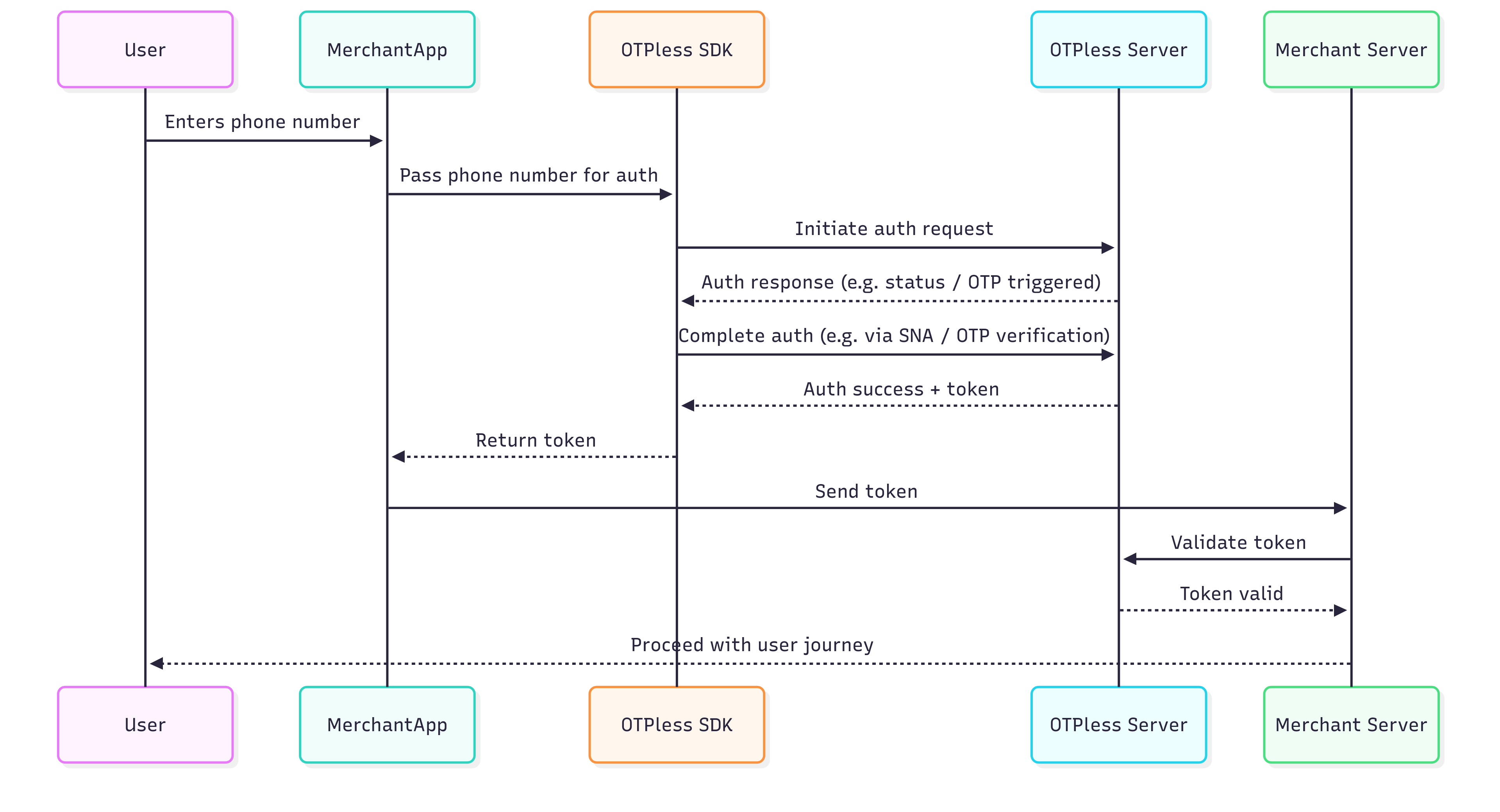
OTPless SDK accepts the user's identity (phone number or email), authenticates through multiple channels, and returns a secure token upon success.The merchant app sends this token to its backend, which verifies it with the OTPless Server before proceeding with the user journey.
 # Integration Steps
## Step 1: Install OTPLESS SDK Dependency
To get started, you need to install dependencies for `kotlinx-serialization`, `kotlin-cocoapods` and Otpless Android & iOS dependencies. You can do this by adding following the below mentioned steps:
### Adding dependencies in gradle files:
Add the `kotlinx-serialization` dependency in your `libs.versions.toml` file:
```toml theme={null}
kotlinCocoapods = { id = "org.jetbrains.kotlin.native.cocoapods", version.ref = "kotlin" }
```
In your project level `build.gradle.kts` file, add the following code:
```kotlin theme={null}
plugins {
alias(libs.plugins.kotlinCocoapods) apply false
}
```
In your `build.gradle.kts(:composeApp)` file, add the following code:
```kotlin theme={null}
plugins {
alias(libs.plugins.kotlinCocoapods)
kotlin("plugin.serialization") version "2.1.10"
}
```
Adding Otpless SDK dependencies and `kotlinx-serialization` in your `build.gradle.kts(:composeApp)` file:
```kotlin theme={null}
kotlin {
sourceSets {
androidMain.dependencies {
implementation("io.github.otpless-tech:otpless-headless-sdk:0.6.5")
}
commonMain.dependencies {
implementation("org.jetbrains.kotlinx:kotlinx-serialization-json:1.6.0")
}
}
// Cocoapods configuration: This will create a cocoapod for your iOS app.
// So, set the description that you would want in your Podspec file.
cocoapods {
homepage = "Your homepage name"
summary = "Your cocoapods summary"
version = "1.0"
ios.deploymentTarget = "15.3"
podfile = project.file("../iosApp/Podfile")
framework {
baseName = "composeApp"
isStatic = true
}
// Add the Otpless SDK dependency to the iOS framework
pod("OtplessBM/Core") {
version = "1.1.3"
extraOpts += listOf("-compiler-option", "-fmodules")
}
}
}
```
### Adding dependencies in Podfile:
Navigate to your `iosApp` directory and initialize the Podfile (**if not done already**) by running the following command:
```bash theme={null}
cd iosApp
pod init
```
This will create a `Podfile` in the `iosApp` directory. Open the `Podfile` and add the following lines:
```ruby theme={null}
# Pods for iosApp
pod 'OtplessBM/Core', '1.1.3'
```
After adding the above lines, run the following command to install the dependencies:
```bash theme={null}
pod install
```
Once all the dependencies are added, `sync the gradle` and run `pod install` to install the iOS app dependency.
## Step 2: Platform specific integration
1. Add intent filter inside your `android/app/src/main/AndroidManifest.xml` file into your Main activity code block:
This step is only needed for Magic Link. Smart Auth integration do not require this step.
```xml theme={null}
```
Replace `YOUR_APP_ID` with [your actual App
ID](https://otpless.com/dashboard/customer/dev-settings/apiKeys) provided in
your OTPLESS dashboard.
2. Add Network Security Config inside your `android/app/src/main/AndroidManifest.xml` file into your `` code block (Only required if you are using the SNA feature):
```xml theme={null}
android:networkSecurityConfig="@xml/otpless_network_security_config"
```
3. Change your activity launchMode to singleTop and exported true for your Main Activity:
This step is only needed for Magic Link. Smart Auth integration do not require this step.
```xml theme={null}
android:launchMode="singleTop"
android:exported="true"
```
3. In your `MainActivity.kt` file, add the following code to handle deeplinks:
This step is only needed for Magic Link. Smart Auth integration do not require this step.
```kotlin theme={null}
import com.otpless.v2.android.sdk.main.OtplessSDK
override fun onNewIntent(intent: Intent) {
super.onNewIntent(intent)
lifecycleScope.launch {
OtplessSDK.onNewIntent(intent)
}
}
```
1. Go to your project's root folder in the terminal and run.
```bash theme={null}
pod install
```
2. Add the following block to your `Info.plist` file:
This step is only needed for Magic Link. Smart Auth integration do not require this step.
```xml info.plist theme={null}
CFBundleURLTypes
CFBundleURLSchemes
otpless.YOUR_APP_ID_IN_LOWERCASE
CFBundleTypeRole
Editor
CFBundleURLName
otpless
LSApplicationQueriesSchemes
whatsapp
otpless
gootpless
com.otpless.ios.app.otpless
googlegmail
```
Replace `YOUR_APP_ID` with [your actual App
ID](https://otpless.com/dashboard/customer/dev-settings/apiKeys) provided in
your OTPLESS dashboard.
3. Add the following block to your `Info.plist` file only if you are using the SNA feature.
* If the `NSAppTransportSecurity` key is not already present, add the entire block below.
* If the `NSAppTransportSecurity` key is already present, add the listed domains one by one under `NSExceptionDomains`.
```xml info.plist theme={null}
NSAppTransportSecurity
NSExceptionDomains
80.in.safr.sekuramobile.com
NSExceptionAllowsInsecureHTTPLoads
NSIncludesSubdomains
api-csp.airtel.in
NSExceptionAllowsInsecureHTTPLoads
NSIncludesSubdomains
in-vil.ipification.com
NSExceptionAllowsInsecureHTTPLoads
NSIncludesSubdomains
partnerapi.jio.com
NSExceptionAllowsInsecureHTTPLoads
NSIncludesSubdomains
```
4. Add the following code to handle deeplinks in your iOS app:
This step is only needed for Magic Link. Smart Auth integration do not require this step.
```swift theme={null}
import OtplessBM
var body: some Scene {
WindowGroup {
ContentView()
// Check for deep link
.onOpenURL(perform: { url in
if Otpless.shared.isOtplessDeeplink(url: url.absoluteURL) {
Otpless.shared.handleDeeplink(url: url.absoluteURL)
}
})
}
}
```
## Step 3: Create `expect` function declarations in `commonMain`
In your `commonMain` source set, create a new file named `OtplessAuthHandler.kt` and add the following code:
```kotlin theme={null}
expect fun initializeOtpless(appId: String, onOtplessResponse: (String) -> Unit, loginUri: String?)
expect fun start(otplessCMPRequest: OtplessCMPRequest)
expect fun cleanup()
data class OtplessCMPRequest(
val phoneNumber: String? = null,
val countryCode: String? = null,
val email: String? = null,
val otp: String? = null,
val otpExpiry: String? = null,
val otpLength: String? = null,
val deliveryChannel: String? = null,
val oAuthChannel: String? = null
)
```
## Step 4: Implement `expect` function declarations in `androidMain` and `iosMain`
```kotlin androidMain theme={null}
import com.otpless.v2.android.sdk.dto.OtplessChannelType
import com.otpless.v2.android.sdk.dto.OtplessRequest
import com.otpless.v2.android.sdk.dto.OtplessResponse
import com.otpless.v2.android.sdk.main.OtplessSDK
import kotlinx.coroutines.CoroutineScope
import kotlinx.coroutines.Dispatchers
import kotlinx.coroutines.Job
import kotlinx.coroutines.launch
var job: Job? = null
actual fun initializeOtpless(appId: String, onOtplessResponse: (String) -> Unit, loginUri: String?) {
OtplessSDK.initialize(appId, activity)
OtplessSDK.setResponseCallback(OtplessResponseHandler::otplessResponseCallback)
OtplessResponseHandler.setBridgeResponseHandler(onOtplessResponse)
}
actual fun start(otplessCMPRequest: OtplessCMPRequest) {
val otplessRequest = OtplessRequest()
if (!otplessCMPRequest.phoneNumber.isNullOrBlank() && !otplessCMPRequest.countryCode.isNullOrBlank()) {
otplessRequest.setPhoneNumber(
number = otplessCMPRequest.phoneNumber,
countryCode = otplessCMPRequest.countryCode
)
} else if (!otplessCMPRequest.email.isNullOrBlank()) {
otplessRequest.setEmail(
email = otplessCMPRequest.email
)
} else {
otplessRequest.setChannelType(OtplessChannelType.valueOf(otplessCMPRequest.oAuthChannel ?: "NONE"))
}
if (!otplessCMPRequest.deliveryChannel.isNullOrBlank()) {
otplessRequest.setDeliveryChannel(otplessCMPRequest.deliveryChannel)
}
if (!otplessCMPRequest.otpExpiry.isNullOrBlank()) {
otplessRequest.setExpiry(otplessCMPRequest.otpExpiry)
}
if (!otplessCMPRequest.otpLength.isNullOrBlank()) {
otplessRequest.setOtpLength(otplessCMPRequest.otpLength)
}
val otp = otplessCMPRequest.otp
if (!otp.isNullOrBlank()) {
otplessRequest.setOtp(otp)
job = CoroutineScope(Dispatchers.IO).launch {
OtplessSDK.start(request = otplessRequest, OtplessResponseHandler::otplessResponseCallback)
}
} else {
job?.cancel()
job = CoroutineScope(Dispatchers.IO).launch {
OtplessSDK.start(request = otplessRequest, OtplessResponseHandler::otplessResponseCallback)
}
}
}
object OtplessResponseHandler {
private var bridgeResponseHandler: ((String) -> Unit)? = null
fun otplessResponseCallback(otplessResponse: OtplessResponse) {
OtplessSDK.commit(otplessResponse)
bridgeResponseHandler?.invoke(
convertOtplessResponseToJsonString(otplessResponse)
)
}
private fun convertOtplessResponseToJsonString(otplessResponse: OtplessResponse): String {
return """
{
"responseType": "${otplessResponse.responseType}",
"response": ${otplessResponse.response?.toString() ?: "null"},
"statusCode": ${otplessResponse.statusCode}
}
""".trimIndent()
}
fun setBridgeResponseHandler(responseHandler: (String) -> Unit) {
bridgeResponseHandler = responseHandler
}
}
actual fun cleanup() {
OtplessSDK.cleanup()
}
```
```kotlin iosMain theme={null}
import cocoapods.OtplessBM.Otpless
import cocoapods.OtplessBM.OtplessRequest
import cocoapods.OtplessBM.setOtplessObjcResponseDelegate
import kotlinx.cinterop.ExperimentalForeignApi
import kotlinx.coroutines.CoroutineScope
import kotlinx.coroutines.Dispatchers
import kotlinx.coroutines.IO
import kotlinx.coroutines.Job
import kotlinx.coroutines.launch
var job: Job? = null
@OptIn(ExperimentalForeignApi::class)
actual fun initializeOtpless(appId: String, onOtplessResponse: (String) -> Unit, loginUri: String?) {
Otpless.shared().setOtplessObjcResponseDelegate(otplessResponseDelegate = { response ->
Otpless.shared().objcCommit(response)
if (!response.isNullOrBlank()) {
onOtplessResponse(response)
}
})
Otpless.shared().initialiseWithAppId(appId = appId, vc = MainViewController(), loginUri = null, shouldShowOtplessOneTapUI = true)
}
@OptIn(ExperimentalForeignApi::class)
actual fun start(otplessCMPRequest: OtplessCMPRequest) {
val otplessRequest = OtplessRequest()
if (!otplessCMPRequest.phoneNumber.isNullOrBlank() && !otplessCMPRequest.countryCode.isNullOrBlank()) {
otplessRequest.setWithPhoneNumber(
phoneNumber = otplessCMPRequest.phoneNumber,
withCountryCode = otplessCMPRequest.countryCode
)
} else if (!otplessCMPRequest.email.isNullOrBlank()) {
otplessRequest.setWithEmail(
email = otplessCMPRequest.email
)
} else {
otplessRequest.setWithObjcChannelType(otplessCMPRequest.oAuthChannel ?: "NONE")
}
if (!otplessCMPRequest.deliveryChannel.isNullOrBlank()) {
otplessRequest.setWithDeliveryChannelForTransaction(otplessCMPRequest.deliveryChannel)
}
if (!otplessCMPRequest.otpExpiry.isNullOrBlank()) {
otplessRequest.setWithOtpExpiry(otplessCMPRequest.otpExpiry)
}
if (!otplessCMPRequest.otpLength.isNullOrBlank()) {
otplessRequest.setWithOtpLength(otplessCMPRequest.otpLength)
}
val otp = otplessCMPRequest.otp
if (!otp.isNullOrBlank()) {
otplessRequest.setWithOtp(otp)
job = CoroutineScope(Dispatchers.IO).launch {
Otpless.shared().startWithRequest(otplessRequest = otplessRequest) {
// Leave blank because response will be received in response delegate
}
}
} else {
job?.cancel()
job = CoroutineScope(Dispatchers.IO).launch {
Otpless.shared().startWithRequest(otplessRequest = otplessRequest) {
// Leave blank because response will be received in response delegate
}
}
}
}
@OptIn(ExperimentalForeignApi::class)
actual fun cleanup() {
Otpless.shared().cleanup()
}
```
## Step 5: Initialize the Otpless SDK
In your `LoginScreen.kt` file, initialize the Otpless SDK. Make sure to initialize the SDK in `DisposableEffect` block to free the resources consumed by Otpless once your `LoginScreen.kt` is destroyed.
```kotlin theme={null}
DisposableEffect(key1 = Unit) {
// Use key1 as Unit so that the SDK is not re-initialized on recomposition
initializeOtpless(
appId = "YOUR_APPID",
onOtplessResponse = { otplessResponseString ->
response = otplessResponseString + "\n\n" + response
handleOtplessResponse(otplessResponseString, onOTPAutoRead = {
otp = it
})
},
loginUri = null
)
onDispose {
cleanup()
}
}
```
To handle the Otpless response, create a function named `handleOtplessResponse` in your `LoginScreen.kt` file. This function will handle the response received from the Otpless SDK.
```kotlin theme={null}
import kotlinx.serialization.json.Json
import kotlinx.serialization.json.JsonObject
import kotlinx.serialization.json.contentOrNull
import kotlinx.serialization.json.intOrNull
import kotlinx.serialization.json.jsonObject
import kotlinx.serialization.json.jsonPrimitive
fun handleOtplessResponse(responseJsonString: String, onOTPAutoRead: (String) -> Unit) {
val parsedElement = Json.parseToJsonElement(responseJsonString).jsonObject
val responseType = parsedElement["responseType"]?.jsonPrimitive?.contentOrNull
val statusCode = parsedElement["statusCode"]?.jsonPrimitive?.intOrNull
val responseJsonObject = parsedElement["response"]?.jsonObject
when (responseType) {
"SDK_READY" -> {
// SDK initialized successfully, enable continue button
log("SDK is ready!")
}
"FAILED" -> {
log("SDK initialization failed!")
if (statusCode == 5003) {
// SDK initialization failed, retry initializing
} else {
// General failure handling
}
}
"INITIATE" -> {
if (statusCode != 200) {
if (getPlatformName().lowercase() == "android") {
handleInitiateErrorAndroid(responseJsonObject)
} else {
handleInitiateErrorIos(responseJsonObject)
}
} else {
val authType = responseJsonObject?.get("authType")?.jsonPrimitive?.contentOrNull
when (authType) {
"OTP" -> {
log("Authentication started using OTP")
// Take user to OTP verification screen
}
"SILENT_AUTH" -> {
log("Authentication started using Silent Auth")
// Handle Silent Authentication initiation (show loading)
}
}
}
}
"OTP_AUTO_READ" -> {
// Only applicable in Android
val otp = responseJsonObject?.get("otp")?.jsonPrimitive?.contentOrNull
if (!otp.isNullOrBlank()) {
// Autofill OTP in your text field
onOTPAutoRead(otp)
}
}
"VERIFY" -> {
val authType = responseJsonObject?.get("authType")?.jsonPrimitive?.contentOrNull
if (authType == "SILENT_AUTH") {
if (statusCode == 9106) {
// Silent Auth + fallback failed → gracefully exit auth flow
log("SNA + fallback failed!")
} else {
log("SNA failed, trying fallback!")
}
} else {
if (getPlatformName().lowercase() == "android") {
handleVerifyErrorAndroid(responseJsonObject)
} else {
handleVerifyErrorIos(responseJsonObject)
}
}
}
"DELIVERY_STATUS" -> {
val authType = responseJsonObject?.get("authType")?.jsonPrimitive?.contentOrNull
val deliveryChannel = responseJsonObject?.get("deliveryChannel")?.jsonPrimitive?.contentOrNull
// Handle delivery status (authType, deliveryChannel)
log("DELIVERY_STATUS: authType: $authType \b deliveryChannel: $deliveryChannel")
}
"FALLBACK_TRIGGERED" -> {
val newDeliveryChannel = responseJsonObject?.get("deliveryChannel")?.jsonPrimitive?.contentOrNull
// Handle fallback deliveryChannel
log("Fallback triggered, new delivery channel: $newDeliveryChannel")
}
"ONETAP" -> {
val data = responseJsonObject?.get("data")?.jsonObject
val token = data?.get("token")?.jsonPrimitive?.contentOrNull
if (!token.isNullOrBlank()) {
// Process token and proceed
log("Token: $token")
}
}
}
}
```
## Response Objects Structure
```json theme={null}
{
"responseType": "SDK_READY",
"statusCode": 200,
"response": {
"success": true
},
}
```
```json theme={null}
{
"responseType": "FAILED",
"statusCode": 5003,
"response": {
"errorCode": "5003",
"errorMessage": "Failed to initialize the SDK"
}
}
```
```json theme={null}
{
"responseType": "INITIATE",
"statusCode": 200,
"response": {
"requestId": "abc123xyz",
"channel": "MOBILE_LOGIN",
"authType": "MOBILE_LOGIN",
"deliveryChannel": "SMS",
}
}
```
```json theme={null}
{
"responseType": "OTP_AUTO_READ",
"statusCode": 200,
"response": {
"otp": "482913"
}
}
```
All VERIFY response types will always return a non-200 status code.
```json theme={null}
{
"responseType": "VERIFY",
"statusCode": 400,
"response": {
"errorCode":"7118",
"errorMessage":"Request error: Incorrect OTP!",
"authType":"OTP"
}
}
```
```json theme={null}
{
"responseType": "ONETAP",
"statusCode": 200,
"response": {
"token": "your_token_here",
"status": "SUCCESS",
"userId": "userId_for_identity",
"timestamp": "2024-07-11T12:51:42Z",
"identities": [],
"idToken": "jwt_token",
"network": {},
"deviceInfo": {},
"sessionInfo": { },
"firebaseInfo": {}
}
}
```
```json theme={null}
{
"responseType": "DELIVERY_STATUS",
"statusCode": 200,
"response": {
"deliveryChannel": "WHATSAPP",
"communicationDelivered": true,
"authType": "OTP"
}
}
```
```json theme={null}
{
"responseType": "FALLBACK_TRIGGERED",
"statusCode": 200,
"response": {
"requestId": "req_98765abc",
"channel": "MOBILE_LOGIN",
"authType": "MOBILE_LOGIN",
"deliveryChannel": "SMS"
}
}
```
## Step 6: Start the Otpless SDK
In your `LoginScreen.kt` file, start the Otpless SDK by calling the `start` function with the required parameters.
Phone authentication allows users to verify their identity using their phone number. Merchants can choose from various authentication methods:
* **Silent Authentication (SNA)** – Automatically verifies the user without requiring OTP or MAGICLINK.
* **OTP on Desired Channel** – Sends a one-time password (OTP) via SMS, WhatsApp, or another preferred channel.
* **Magic Link** – Sends a link that users can click to authenticate.
* **SNA + OTP** – Uses silent authentication first and falls back to OTP if needed.
* **OTP + Magic Link** – Sends both an OTP and a magic link, allowing users to authenticate via either method.
```kotlin theme={null}
val otplessCMPRequest = OtplessCMPRequest(
phoneNumber = phoneNumber,
countryCode = countryCode
)
start(otplessCMPRequest)
```
### Verify OTP
To verify the OTP entered by the user, use the `verify` method with the necessary parameters. Verifying OTP is required only in case of `OTP` authentication. No need to verify `OTP` in case of `MAGICLINK`.
```kotlin theme={null}
val otplessCMPRequest = OtplessCMPRequest(
otp = otp,
phoneNumber = phoneNumber,
countryCode = countryCode
)
start(otplessCMPRequest)
```
**Email Authentication** 📧\
Email authentication verifies users using their email address. Merchants can choose from:
* **OTP via Email** – Sends a one-time password to the user’s email.
* **Magic Link** – Sends a clickable authentication link to the email.
* **OTP + Magic Link** – Provides both options for flexibility.
```kotlin theme={null}
val otplessCMPRequest = OtplessCMPRequest(
email = email
)
start(otplessCMPRequest)
```
### Verify OTP
To verify the OTP entered by the user, use the `verify` method with the necessary parameters. Verifying OTP is required only in case of `OTP` authentication. No need to verify `OTP` in case of `MAGICLINK`.
```kotlin theme={null}
val otplessCMPRequest = OtplessCMPRequest(
otp = otp,
email = email
)
start(otplessCMPRequest)
```
**OAuth Authentication** 🔑\
OAuth allows users to authenticate using third-party services like Google, GitHub, or WhatsApp. Instead of entering credentials manually, users can log in using their existing accounts, streamlining the authentication process.
This is the list of **channels** you can use for OAuth login:
* WHATSAPP
* APPLE
* GMAIL
* TWITTER
* DISCORD
* SLACK
* FACEBOOK
* LINKEDIN
* MICROSOFT
* LINE
* LINEAR
* NOTION
* TWITCH
* GITHUB
* BITBUCKET
* ATLASSIAN
* GITLAB
```kotlin theme={null}
val otplessCMPRequest = OtplessCMPRequest(
oAuthChannel = "CHANNEL_NAME"
)
// Make sure that the CHANNEL_NAME is in uppercase
start(otplessCMPRequest)
```
## Error Handling
The error codes for android and iOS have to be handled separately.
* Checkout [android error codes](https://otpless.com/docs/frontend-sdks/app-sdks/android/new/references/error-codes)
* Checkout [iOS error codes](https://otpless.com/docs/frontend-sdks/app-sdks/ios/new/references/error-codes)
* To handle all the **verification/initiation error codes** for android and iOS, refer to the following code:
```kotlin Initiate error theme={null}
private fun handleInitiateErrorAndroid(responseJsonObject: JsonObject?) {
val errorCode = responseJsonObject?.get("errorCode")?.jsonPrimitive?.contentOrNull
val errorMessage = responseJsonObject?.get("errorMessage")?.jsonPrimitive?.contentOrNull
when (errorCode) {
"7101" -> log("Android OTPless Error: $errorMessage")
"7102" -> log("Android OTPless Error: $errorMessage")
"7103" -> log("Android OTPless Error: $errorMessage")
"7104" -> log("Android OTPless Error: $errorMessage")
"7105" -> log("Android OTPless Error: $errorMessage")
"7106" -> log("Android OTPless Error: $errorMessage")
"7113" -> log("Android OTPless Error: $errorMessage")
"7116" -> log("Android OTPless Error: $errorMessage")
"7121" -> log("Android OTPless Error: $errorMessage")
"4000" -> log("Android OTPless Error: $errorMessage")
"4003" -> log("Android OTPless Error: $errorMessage")
"401", "7025" -> log("Android OTPless Error: $errorMessage")
"7020", "7022", "7023", "7024" -> log("Android OTPless Error: $errorMessage")
"500" -> log("Android OTPless Error: $errorMessage")
"9100", "9104", "9103" -> log("Android OTPless Error: $errorMessage")
}
}
```
```kotlin Verify error theme={null}
private fun handleVerifyErrorAndroid(responseJsonObject: JsonObject?) {
val errorCode = responseJsonObject?.get("errorCode")?.jsonPrimitive?.contentOrNull
val errorMessage = responseJsonObject?.get("errorMessage")?.jsonPrimitive?.contentOrNull
when (errorCode) {
"7112" -> {
// Handle request error: Empty OTP
log("Android OTPless Error: $errorCode \b $errorMessage")
}
"7115" -> {
// Handle request error: OTP is already verified
log("Android OTPless Error: $errorCode \b $errorMessage")
}
"7118" -> {
// Handle request error: Incorrect OTP
log("Android OTPless Error:$errorCode \b $errorMessage")
}
"7303" -> {
// Handle request error: OTP expired
log("Android OTPless Error: $errorCode \b $errorMessage")
}
"4000" -> {
// Handle invalid request
log("Android OTPless Error:$errorCode \b $errorMessage")
}
"9100", "9104", "9103" -> {
// Handle network error: Socket timeout exception
log("Android OTPless Error: $errorCode \b $errorMessage")
}
else -> {
// Handle unknown error
log("Android OTPless Error:Unknown error \b $errorMessage")
}
}
}
```
```kotlin Initiate error theme={null}
private fun handleInitiateErrorIos(responseJsonObject: JsonObject?) {
val errorCode = responseJsonObject?.get("errorCode")?.jsonPrimitive?.contentOrNull
val errorMessage = responseJsonObject?.get("errorMessage")?.jsonPrimitive?.contentOrNull ?: "Unknown error"
when (errorCode) {
"7101" -> log("iOS OTPless Error: Invalid parameters values or missing parameters - $errorMessage")
"7102" -> log("iOS OTPless Error: Invalid phone number - $errorMessage")
"7103" -> log("iOS OTPless Error: Invalid phone number delivery channel - $errorMessage")
"7104" -> log("iOS OTPless Error: Invalid email - $errorMessage")
"7105" -> log("iOS OTPless Error: Invalid email channel - $errorMessage")
"7106" -> log("iOS OTPless Error: Invalid phone number or email - $errorMessage")
"7113" -> log("iOS OTPless Error: Invalid expiry - $errorMessage")
"7116" -> log("iOS OTPless Error: OTP Length is invalid (4 or 6 only allowed) - $errorMessage")
"7121" -> log("iOS OTPless Error: Invalid app hash - $errorMessage")
"4000" -> log("iOS OTPless Error: Invalid request values - $errorMessage")
"4003" -> log("iOS OTPless Error: Incorrect request channel - $errorMessage")
"401", "7025" -> log("iOS OTPless Error: Unauthorized request or country not enabled - $errorMessage")
// Rate limiting errors
"7020", "7022", "7023", "7024" -> log("iOS OTPless Error: Rate limiting error (Too many requests) - $errorMessage")
// Feature not supported on older iOS versions
"5900" -> log("iOS OTPless Error: The feature is not supported because it requires a newer iOS version - ${errorMessage.ifBlank { "The requested feature is only available on newer iOS versions." }}")
// Network-related errors
"9100", "9101", "9102", "9103", "9104", "9105", "9110" -> log(
"iOS OTPless Error: Network error - " + when (errorCode) {
"9100" -> errorMessage.ifBlank { "The request took too long to complete and was aborted." }
"9101" -> errorMessage.ifBlank { "The connection was interrupted before the request could complete." }
"9102" -> errorMessage.ifBlank { "The domain name could not be resolved, possibly due to network issues." }
"9103" -> errorMessage.ifBlank { "The server is unreachable, possibly due to downtime or incorrect configurations." }
"9104" -> errorMessage.ifBlank { "The device is not connected to the internet." }
"9105" -> errorMessage.ifBlank { "A secure connection could not be established due to SSL/TLS issues." }
"9110" -> errorMessage.ifBlank { "The authentication request was manually canceled by the user or the system." }
else -> errorMessage
}
)
else -> log("iOS OTPless Error: $errorMessage")
}
}
```
```kotlin Verify error theme={null}
private fun handleVerifyErrorIos(responseJsonObject: JsonObject?) {
val errorCode = responseJsonObject?.get("errorCode")?.jsonPrimitive?.contentOrNull
val errorMessage = responseJsonObject?.get("errorMessage")?.jsonPrimitive?.contentOrNull ?: "Unknown error"
when (errorCode) {
"7112" -> log("iOS OTPless Error: OTP is empty - $errorMessage")
"7115" -> log("iOS OTPless Error: OTP already verified - $errorMessage")
"7118" -> log("iOS OTPless Error: Incorrect OTP - $errorMessage")
"7303" -> log("iOS OTPless Error: OTP expired - $errorMessage")
"4000" -> log("iOS OTPless Error: Invalid request values - $errorMessage")
// Network-related errors
"9100", "9101", "9102", "9103", "9104", "9105", "9110" -> log(
"iOS OTPless Error: Network error - " + when (errorCode) {
"9100" -> errorMessage.ifBlank { "The request took too long to complete and was aborted." }
"9101" -> errorMessage.ifBlank { "The connection was interrupted before the request could complete." }
"9102" -> errorMessage.ifBlank { "The domain name could not be resolved, possibly due to network issues." }
"9103" -> errorMessage.ifBlank { "The server is unreachable, possibly due to downtime or incorrect configurations." }
"9104" -> errorMessage.ifBlank { "The device is not connected to the internet." }
"9105" -> errorMessage.ifBlank { "A secure connection could not be established due to SSL/TLS issues." }
"9110" -> errorMessage.ifBlank { "The authentication request was manually canceled by the user or the system." }
else -> errorMessage
}
)
else -> log("iOS OTPless Error: $errorMessage")
}
}
```
# Integration Steps
## Step 1: Install OTPLESS SDK Dependency
To get started, you need to install dependencies for `kotlinx-serialization`, `kotlin-cocoapods` and Otpless Android & iOS dependencies. You can do this by adding following the below mentioned steps:
### Adding dependencies in gradle files:
Add the `kotlinx-serialization` dependency in your `libs.versions.toml` file:
```toml theme={null}
kotlinCocoapods = { id = "org.jetbrains.kotlin.native.cocoapods", version.ref = "kotlin" }
```
In your project level `build.gradle.kts` file, add the following code:
```kotlin theme={null}
plugins {
alias(libs.plugins.kotlinCocoapods) apply false
}
```
In your `build.gradle.kts(:composeApp)` file, add the following code:
```kotlin theme={null}
plugins {
alias(libs.plugins.kotlinCocoapods)
kotlin("plugin.serialization") version "2.1.10"
}
```
Adding Otpless SDK dependencies and `kotlinx-serialization` in your `build.gradle.kts(:composeApp)` file:
```kotlin theme={null}
kotlin {
sourceSets {
androidMain.dependencies {
implementation("io.github.otpless-tech:otpless-headless-sdk:0.6.5")
}
commonMain.dependencies {
implementation("org.jetbrains.kotlinx:kotlinx-serialization-json:1.6.0")
}
}
// Cocoapods configuration: This will create a cocoapod for your iOS app.
// So, set the description that you would want in your Podspec file.
cocoapods {
homepage = "Your homepage name"
summary = "Your cocoapods summary"
version = "1.0"
ios.deploymentTarget = "15.3"
podfile = project.file("../iosApp/Podfile")
framework {
baseName = "composeApp"
isStatic = true
}
// Add the Otpless SDK dependency to the iOS framework
pod("OtplessBM/Core") {
version = "1.1.3"
extraOpts += listOf("-compiler-option", "-fmodules")
}
}
}
```
### Adding dependencies in Podfile:
Navigate to your `iosApp` directory and initialize the Podfile (**if not done already**) by running the following command:
```bash theme={null}
cd iosApp
pod init
```
This will create a `Podfile` in the `iosApp` directory. Open the `Podfile` and add the following lines:
```ruby theme={null}
# Pods for iosApp
pod 'OtplessBM/Core', '1.1.3'
```
After adding the above lines, run the following command to install the dependencies:
```bash theme={null}
pod install
```
Once all the dependencies are added, `sync the gradle` and run `pod install` to install the iOS app dependency.
## Step 2: Platform specific integration
1. Add intent filter inside your `android/app/src/main/AndroidManifest.xml` file into your Main activity code block:
This step is only needed for Magic Link. Smart Auth integration do not require this step.
```xml theme={null}
```
Replace `YOUR_APP_ID` with [your actual App
ID](https://otpless.com/dashboard/customer/dev-settings/apiKeys) provided in
your OTPLESS dashboard.
2. Add Network Security Config inside your `android/app/src/main/AndroidManifest.xml` file into your `` code block (Only required if you are using the SNA feature):
```xml theme={null}
android:networkSecurityConfig="@xml/otpless_network_security_config"
```
3. Change your activity launchMode to singleTop and exported true for your Main Activity:
This step is only needed for Magic Link. Smart Auth integration do not require this step.
```xml theme={null}
android:launchMode="singleTop"
android:exported="true"
```
3. In your `MainActivity.kt` file, add the following code to handle deeplinks:
This step is only needed for Magic Link. Smart Auth integration do not require this step.
```kotlin theme={null}
import com.otpless.v2.android.sdk.main.OtplessSDK
override fun onNewIntent(intent: Intent) {
super.onNewIntent(intent)
lifecycleScope.launch {
OtplessSDK.onNewIntent(intent)
}
}
```
1. Go to your project's root folder in the terminal and run.
```bash theme={null}
pod install
```
2. Add the following block to your `Info.plist` file:
This step is only needed for Magic Link. Smart Auth integration do not require this step.
```xml info.plist theme={null}
CFBundleURLTypes
CFBundleURLSchemes
otpless.YOUR_APP_ID_IN_LOWERCASE
CFBundleTypeRole
Editor
CFBundleURLName
otpless
LSApplicationQueriesSchemes
whatsapp
otpless
gootpless
com.otpless.ios.app.otpless
googlegmail
```
Replace `YOUR_APP_ID` with [your actual App
ID](https://otpless.com/dashboard/customer/dev-settings/apiKeys) provided in
your OTPLESS dashboard.
3. Add the following block to your `Info.plist` file only if you are using the SNA feature.
* If the `NSAppTransportSecurity` key is not already present, add the entire block below.
* If the `NSAppTransportSecurity` key is already present, add the listed domains one by one under `NSExceptionDomains`.
```xml info.plist theme={null}
NSAppTransportSecurity
NSExceptionDomains
80.in.safr.sekuramobile.com
NSExceptionAllowsInsecureHTTPLoads
NSIncludesSubdomains
api-csp.airtel.in
NSExceptionAllowsInsecureHTTPLoads
NSIncludesSubdomains
in-vil.ipification.com
NSExceptionAllowsInsecureHTTPLoads
NSIncludesSubdomains
partnerapi.jio.com
NSExceptionAllowsInsecureHTTPLoads
NSIncludesSubdomains
```
4. Add the following code to handle deeplinks in your iOS app:
This step is only needed for Magic Link. Smart Auth integration do not require this step.
```swift theme={null}
import OtplessBM
var body: some Scene {
WindowGroup {
ContentView()
// Check for deep link
.onOpenURL(perform: { url in
if Otpless.shared.isOtplessDeeplink(url: url.absoluteURL) {
Otpless.shared.handleDeeplink(url: url.absoluteURL)
}
})
}
}
```
## Step 3: Create `expect` function declarations in `commonMain`
In your `commonMain` source set, create a new file named `OtplessAuthHandler.kt` and add the following code:
```kotlin theme={null}
expect fun initializeOtpless(appId: String, onOtplessResponse: (String) -> Unit, loginUri: String?)
expect fun start(otplessCMPRequest: OtplessCMPRequest)
expect fun cleanup()
data class OtplessCMPRequest(
val phoneNumber: String? = null,
val countryCode: String? = null,
val email: String? = null,
val otp: String? = null,
val otpExpiry: String? = null,
val otpLength: String? = null,
val deliveryChannel: String? = null,
val oAuthChannel: String? = null
)
```
## Step 4: Implement `expect` function declarations in `androidMain` and `iosMain`
```kotlin androidMain theme={null}
import com.otpless.v2.android.sdk.dto.OtplessChannelType
import com.otpless.v2.android.sdk.dto.OtplessRequest
import com.otpless.v2.android.sdk.dto.OtplessResponse
import com.otpless.v2.android.sdk.main.OtplessSDK
import kotlinx.coroutines.CoroutineScope
import kotlinx.coroutines.Dispatchers
import kotlinx.coroutines.Job
import kotlinx.coroutines.launch
var job: Job? = null
actual fun initializeOtpless(appId: String, onOtplessResponse: (String) -> Unit, loginUri: String?) {
OtplessSDK.initialize(appId, activity)
OtplessSDK.setResponseCallback(OtplessResponseHandler::otplessResponseCallback)
OtplessResponseHandler.setBridgeResponseHandler(onOtplessResponse)
}
actual fun start(otplessCMPRequest: OtplessCMPRequest) {
val otplessRequest = OtplessRequest()
if (!otplessCMPRequest.phoneNumber.isNullOrBlank() && !otplessCMPRequest.countryCode.isNullOrBlank()) {
otplessRequest.setPhoneNumber(
number = otplessCMPRequest.phoneNumber,
countryCode = otplessCMPRequest.countryCode
)
} else if (!otplessCMPRequest.email.isNullOrBlank()) {
otplessRequest.setEmail(
email = otplessCMPRequest.email
)
} else {
otplessRequest.setChannelType(OtplessChannelType.valueOf(otplessCMPRequest.oAuthChannel ?: "NONE"))
}
if (!otplessCMPRequest.deliveryChannel.isNullOrBlank()) {
otplessRequest.setDeliveryChannel(otplessCMPRequest.deliveryChannel)
}
if (!otplessCMPRequest.otpExpiry.isNullOrBlank()) {
otplessRequest.setExpiry(otplessCMPRequest.otpExpiry)
}
if (!otplessCMPRequest.otpLength.isNullOrBlank()) {
otplessRequest.setOtpLength(otplessCMPRequest.otpLength)
}
val otp = otplessCMPRequest.otp
if (!otp.isNullOrBlank()) {
otplessRequest.setOtp(otp)
job = CoroutineScope(Dispatchers.IO).launch {
OtplessSDK.start(request = otplessRequest, OtplessResponseHandler::otplessResponseCallback)
}
} else {
job?.cancel()
job = CoroutineScope(Dispatchers.IO).launch {
OtplessSDK.start(request = otplessRequest, OtplessResponseHandler::otplessResponseCallback)
}
}
}
object OtplessResponseHandler {
private var bridgeResponseHandler: ((String) -> Unit)? = null
fun otplessResponseCallback(otplessResponse: OtplessResponse) {
OtplessSDK.commit(otplessResponse)
bridgeResponseHandler?.invoke(
convertOtplessResponseToJsonString(otplessResponse)
)
}
private fun convertOtplessResponseToJsonString(otplessResponse: OtplessResponse): String {
return """
{
"responseType": "${otplessResponse.responseType}",
"response": ${otplessResponse.response?.toString() ?: "null"},
"statusCode": ${otplessResponse.statusCode}
}
""".trimIndent()
}
fun setBridgeResponseHandler(responseHandler: (String) -> Unit) {
bridgeResponseHandler = responseHandler
}
}
actual fun cleanup() {
OtplessSDK.cleanup()
}
```
```kotlin iosMain theme={null}
import cocoapods.OtplessBM.Otpless
import cocoapods.OtplessBM.OtplessRequest
import cocoapods.OtplessBM.setOtplessObjcResponseDelegate
import kotlinx.cinterop.ExperimentalForeignApi
import kotlinx.coroutines.CoroutineScope
import kotlinx.coroutines.Dispatchers
import kotlinx.coroutines.IO
import kotlinx.coroutines.Job
import kotlinx.coroutines.launch
var job: Job? = null
@OptIn(ExperimentalForeignApi::class)
actual fun initializeOtpless(appId: String, onOtplessResponse: (String) -> Unit, loginUri: String?) {
Otpless.shared().setOtplessObjcResponseDelegate(otplessResponseDelegate = { response ->
Otpless.shared().objcCommit(response)
if (!response.isNullOrBlank()) {
onOtplessResponse(response)
}
})
Otpless.shared().initialiseWithAppId(appId = appId, vc = MainViewController(), loginUri = null, shouldShowOtplessOneTapUI = true)
}
@OptIn(ExperimentalForeignApi::class)
actual fun start(otplessCMPRequest: OtplessCMPRequest) {
val otplessRequest = OtplessRequest()
if (!otplessCMPRequest.phoneNumber.isNullOrBlank() && !otplessCMPRequest.countryCode.isNullOrBlank()) {
otplessRequest.setWithPhoneNumber(
phoneNumber = otplessCMPRequest.phoneNumber,
withCountryCode = otplessCMPRequest.countryCode
)
} else if (!otplessCMPRequest.email.isNullOrBlank()) {
otplessRequest.setWithEmail(
email = otplessCMPRequest.email
)
} else {
otplessRequest.setWithObjcChannelType(otplessCMPRequest.oAuthChannel ?: "NONE")
}
if (!otplessCMPRequest.deliveryChannel.isNullOrBlank()) {
otplessRequest.setWithDeliveryChannelForTransaction(otplessCMPRequest.deliveryChannel)
}
if (!otplessCMPRequest.otpExpiry.isNullOrBlank()) {
otplessRequest.setWithOtpExpiry(otplessCMPRequest.otpExpiry)
}
if (!otplessCMPRequest.otpLength.isNullOrBlank()) {
otplessRequest.setWithOtpLength(otplessCMPRequest.otpLength)
}
val otp = otplessCMPRequest.otp
if (!otp.isNullOrBlank()) {
otplessRequest.setWithOtp(otp)
job = CoroutineScope(Dispatchers.IO).launch {
Otpless.shared().startWithRequest(otplessRequest = otplessRequest) {
// Leave blank because response will be received in response delegate
}
}
} else {
job?.cancel()
job = CoroutineScope(Dispatchers.IO).launch {
Otpless.shared().startWithRequest(otplessRequest = otplessRequest) {
// Leave blank because response will be received in response delegate
}
}
}
}
@OptIn(ExperimentalForeignApi::class)
actual fun cleanup() {
Otpless.shared().cleanup()
}
```
## Step 5: Initialize the Otpless SDK
In your `LoginScreen.kt` file, initialize the Otpless SDK. Make sure to initialize the SDK in `DisposableEffect` block to free the resources consumed by Otpless once your `LoginScreen.kt` is destroyed.
```kotlin theme={null}
DisposableEffect(key1 = Unit) {
// Use key1 as Unit so that the SDK is not re-initialized on recomposition
initializeOtpless(
appId = "YOUR_APPID",
onOtplessResponse = { otplessResponseString ->
response = otplessResponseString + "\n\n" + response
handleOtplessResponse(otplessResponseString, onOTPAutoRead = {
otp = it
})
},
loginUri = null
)
onDispose {
cleanup()
}
}
```
To handle the Otpless response, create a function named `handleOtplessResponse` in your `LoginScreen.kt` file. This function will handle the response received from the Otpless SDK.
```kotlin theme={null}
import kotlinx.serialization.json.Json
import kotlinx.serialization.json.JsonObject
import kotlinx.serialization.json.contentOrNull
import kotlinx.serialization.json.intOrNull
import kotlinx.serialization.json.jsonObject
import kotlinx.serialization.json.jsonPrimitive
fun handleOtplessResponse(responseJsonString: String, onOTPAutoRead: (String) -> Unit) {
val parsedElement = Json.parseToJsonElement(responseJsonString).jsonObject
val responseType = parsedElement["responseType"]?.jsonPrimitive?.contentOrNull
val statusCode = parsedElement["statusCode"]?.jsonPrimitive?.intOrNull
val responseJsonObject = parsedElement["response"]?.jsonObject
when (responseType) {
"SDK_READY" -> {
// SDK initialized successfully, enable continue button
log("SDK is ready!")
}
"FAILED" -> {
log("SDK initialization failed!")
if (statusCode == 5003) {
// SDK initialization failed, retry initializing
} else {
// General failure handling
}
}
"INITIATE" -> {
if (statusCode != 200) {
if (getPlatformName().lowercase() == "android") {
handleInitiateErrorAndroid(responseJsonObject)
} else {
handleInitiateErrorIos(responseJsonObject)
}
} else {
val authType = responseJsonObject?.get("authType")?.jsonPrimitive?.contentOrNull
when (authType) {
"OTP" -> {
log("Authentication started using OTP")
// Take user to OTP verification screen
}
"SILENT_AUTH" -> {
log("Authentication started using Silent Auth")
// Handle Silent Authentication initiation (show loading)
}
}
}
}
"OTP_AUTO_READ" -> {
// Only applicable in Android
val otp = responseJsonObject?.get("otp")?.jsonPrimitive?.contentOrNull
if (!otp.isNullOrBlank()) {
// Autofill OTP in your text field
onOTPAutoRead(otp)
}
}
"VERIFY" -> {
val authType = responseJsonObject?.get("authType")?.jsonPrimitive?.contentOrNull
if (authType == "SILENT_AUTH") {
if (statusCode == 9106) {
// Silent Auth + fallback failed → gracefully exit auth flow
log("SNA + fallback failed!")
} else {
log("SNA failed, trying fallback!")
}
} else {
if (getPlatformName().lowercase() == "android") {
handleVerifyErrorAndroid(responseJsonObject)
} else {
handleVerifyErrorIos(responseJsonObject)
}
}
}
"DELIVERY_STATUS" -> {
val authType = responseJsonObject?.get("authType")?.jsonPrimitive?.contentOrNull
val deliveryChannel = responseJsonObject?.get("deliveryChannel")?.jsonPrimitive?.contentOrNull
// Handle delivery status (authType, deliveryChannel)
log("DELIVERY_STATUS: authType: $authType \b deliveryChannel: $deliveryChannel")
}
"FALLBACK_TRIGGERED" -> {
val newDeliveryChannel = responseJsonObject?.get("deliveryChannel")?.jsonPrimitive?.contentOrNull
// Handle fallback deliveryChannel
log("Fallback triggered, new delivery channel: $newDeliveryChannel")
}
"ONETAP" -> {
val data = responseJsonObject?.get("data")?.jsonObject
val token = data?.get("token")?.jsonPrimitive?.contentOrNull
if (!token.isNullOrBlank()) {
// Process token and proceed
log("Token: $token")
}
}
}
}
```
## Response Objects Structure
```json theme={null}
{
"responseType": "SDK_READY",
"statusCode": 200,
"response": {
"success": true
},
}
```
```json theme={null}
{
"responseType": "FAILED",
"statusCode": 5003,
"response": {
"errorCode": "5003",
"errorMessage": "Failed to initialize the SDK"
}
}
```
```json theme={null}
{
"responseType": "INITIATE",
"statusCode": 200,
"response": {
"requestId": "abc123xyz",
"channel": "MOBILE_LOGIN",
"authType": "MOBILE_LOGIN",
"deliveryChannel": "SMS",
}
}
```
```json theme={null}
{
"responseType": "OTP_AUTO_READ",
"statusCode": 200,
"response": {
"otp": "482913"
}
}
```
All VERIFY response types will always return a non-200 status code.
```json theme={null}
{
"responseType": "VERIFY",
"statusCode": 400,
"response": {
"errorCode":"7118",
"errorMessage":"Request error: Incorrect OTP!",
"authType":"OTP"
}
}
```
```json theme={null}
{
"responseType": "ONETAP",
"statusCode": 200,
"response": {
"token": "your_token_here",
"status": "SUCCESS",
"userId": "userId_for_identity",
"timestamp": "2024-07-11T12:51:42Z",
"identities": [],
"idToken": "jwt_token",
"network": {},
"deviceInfo": {},
"sessionInfo": { },
"firebaseInfo": {}
}
}
```
```json theme={null}
{
"responseType": "DELIVERY_STATUS",
"statusCode": 200,
"response": {
"deliveryChannel": "WHATSAPP",
"communicationDelivered": true,
"authType": "OTP"
}
}
```
```json theme={null}
{
"responseType": "FALLBACK_TRIGGERED",
"statusCode": 200,
"response": {
"requestId": "req_98765abc",
"channel": "MOBILE_LOGIN",
"authType": "MOBILE_LOGIN",
"deliveryChannel": "SMS"
}
}
```
## Step 6: Start the Otpless SDK
In your `LoginScreen.kt` file, start the Otpless SDK by calling the `start` function with the required parameters.
Phone authentication allows users to verify their identity using their phone number. Merchants can choose from various authentication methods:
* **Silent Authentication (SNA)** – Automatically verifies the user without requiring OTP or MAGICLINK.
* **OTP on Desired Channel** – Sends a one-time password (OTP) via SMS, WhatsApp, or another preferred channel.
* **Magic Link** – Sends a link that users can click to authenticate.
* **SNA + OTP** – Uses silent authentication first and falls back to OTP if needed.
* **OTP + Magic Link** – Sends both an OTP and a magic link, allowing users to authenticate via either method.
```kotlin theme={null}
val otplessCMPRequest = OtplessCMPRequest(
phoneNumber = phoneNumber,
countryCode = countryCode
)
start(otplessCMPRequest)
```
### Verify OTP
To verify the OTP entered by the user, use the `verify` method with the necessary parameters. Verifying OTP is required only in case of `OTP` authentication. No need to verify `OTP` in case of `MAGICLINK`.
```kotlin theme={null}
val otplessCMPRequest = OtplessCMPRequest(
otp = otp,
phoneNumber = phoneNumber,
countryCode = countryCode
)
start(otplessCMPRequest)
```
**Email Authentication** 📧\
Email authentication verifies users using their email address. Merchants can choose from:
* **OTP via Email** – Sends a one-time password to the user’s email.
* **Magic Link** – Sends a clickable authentication link to the email.
* **OTP + Magic Link** – Provides both options for flexibility.
```kotlin theme={null}
val otplessCMPRequest = OtplessCMPRequest(
email = email
)
start(otplessCMPRequest)
```
### Verify OTP
To verify the OTP entered by the user, use the `verify` method with the necessary parameters. Verifying OTP is required only in case of `OTP` authentication. No need to verify `OTP` in case of `MAGICLINK`.
```kotlin theme={null}
val otplessCMPRequest = OtplessCMPRequest(
otp = otp,
email = email
)
start(otplessCMPRequest)
```
**OAuth Authentication** 🔑\
OAuth allows users to authenticate using third-party services like Google, GitHub, or WhatsApp. Instead of entering credentials manually, users can log in using their existing accounts, streamlining the authentication process.
This is the list of **channels** you can use for OAuth login:
* WHATSAPP
* APPLE
* GMAIL
* TWITTER
* DISCORD
* SLACK
* FACEBOOK
* LINKEDIN
* MICROSOFT
* LINE
* LINEAR
* NOTION
* TWITCH
* GITHUB
* BITBUCKET
* ATLASSIAN
* GITLAB
```kotlin theme={null}
val otplessCMPRequest = OtplessCMPRequest(
oAuthChannel = "CHANNEL_NAME"
)
// Make sure that the CHANNEL_NAME is in uppercase
start(otplessCMPRequest)
```
## Error Handling
The error codes for android and iOS have to be handled separately.
* Checkout [android error codes](https://otpless.com/docs/frontend-sdks/app-sdks/android/new/references/error-codes)
* Checkout [iOS error codes](https://otpless.com/docs/frontend-sdks/app-sdks/ios/new/references/error-codes)
* To handle all the **verification/initiation error codes** for android and iOS, refer to the following code:
```kotlin Initiate error theme={null}
private fun handleInitiateErrorAndroid(responseJsonObject: JsonObject?) {
val errorCode = responseJsonObject?.get("errorCode")?.jsonPrimitive?.contentOrNull
val errorMessage = responseJsonObject?.get("errorMessage")?.jsonPrimitive?.contentOrNull
when (errorCode) {
"7101" -> log("Android OTPless Error: $errorMessage")
"7102" -> log("Android OTPless Error: $errorMessage")
"7103" -> log("Android OTPless Error: $errorMessage")
"7104" -> log("Android OTPless Error: $errorMessage")
"7105" -> log("Android OTPless Error: $errorMessage")
"7106" -> log("Android OTPless Error: $errorMessage")
"7113" -> log("Android OTPless Error: $errorMessage")
"7116" -> log("Android OTPless Error: $errorMessage")
"7121" -> log("Android OTPless Error: $errorMessage")
"4000" -> log("Android OTPless Error: $errorMessage")
"4003" -> log("Android OTPless Error: $errorMessage")
"401", "7025" -> log("Android OTPless Error: $errorMessage")
"7020", "7022", "7023", "7024" -> log("Android OTPless Error: $errorMessage")
"500" -> log("Android OTPless Error: $errorMessage")
"9100", "9104", "9103" -> log("Android OTPless Error: $errorMessage")
}
}
```
```kotlin Verify error theme={null}
private fun handleVerifyErrorAndroid(responseJsonObject: JsonObject?) {
val errorCode = responseJsonObject?.get("errorCode")?.jsonPrimitive?.contentOrNull
val errorMessage = responseJsonObject?.get("errorMessage")?.jsonPrimitive?.contentOrNull
when (errorCode) {
"7112" -> {
// Handle request error: Empty OTP
log("Android OTPless Error: $errorCode \b $errorMessage")
}
"7115" -> {
// Handle request error: OTP is already verified
log("Android OTPless Error: $errorCode \b $errorMessage")
}
"7118" -> {
// Handle request error: Incorrect OTP
log("Android OTPless Error:$errorCode \b $errorMessage")
}
"7303" -> {
// Handle request error: OTP expired
log("Android OTPless Error: $errorCode \b $errorMessage")
}
"4000" -> {
// Handle invalid request
log("Android OTPless Error:$errorCode \b $errorMessage")
}
"9100", "9104", "9103" -> {
// Handle network error: Socket timeout exception
log("Android OTPless Error: $errorCode \b $errorMessage")
}
else -> {
// Handle unknown error
log("Android OTPless Error:Unknown error \b $errorMessage")
}
}
}
```
```kotlin Initiate error theme={null}
private fun handleInitiateErrorIos(responseJsonObject: JsonObject?) {
val errorCode = responseJsonObject?.get("errorCode")?.jsonPrimitive?.contentOrNull
val errorMessage = responseJsonObject?.get("errorMessage")?.jsonPrimitive?.contentOrNull ?: "Unknown error"
when (errorCode) {
"7101" -> log("iOS OTPless Error: Invalid parameters values or missing parameters - $errorMessage")
"7102" -> log("iOS OTPless Error: Invalid phone number - $errorMessage")
"7103" -> log("iOS OTPless Error: Invalid phone number delivery channel - $errorMessage")
"7104" -> log("iOS OTPless Error: Invalid email - $errorMessage")
"7105" -> log("iOS OTPless Error: Invalid email channel - $errorMessage")
"7106" -> log("iOS OTPless Error: Invalid phone number or email - $errorMessage")
"7113" -> log("iOS OTPless Error: Invalid expiry - $errorMessage")
"7116" -> log("iOS OTPless Error: OTP Length is invalid (4 or 6 only allowed) - $errorMessage")
"7121" -> log("iOS OTPless Error: Invalid app hash - $errorMessage")
"4000" -> log("iOS OTPless Error: Invalid request values - $errorMessage")
"4003" -> log("iOS OTPless Error: Incorrect request channel - $errorMessage")
"401", "7025" -> log("iOS OTPless Error: Unauthorized request or country not enabled - $errorMessage")
// Rate limiting errors
"7020", "7022", "7023", "7024" -> log("iOS OTPless Error: Rate limiting error (Too many requests) - $errorMessage")
// Feature not supported on older iOS versions
"5900" -> log("iOS OTPless Error: The feature is not supported because it requires a newer iOS version - ${errorMessage.ifBlank { "The requested feature is only available on newer iOS versions." }}")
// Network-related errors
"9100", "9101", "9102", "9103", "9104", "9105", "9110" -> log(
"iOS OTPless Error: Network error - " + when (errorCode) {
"9100" -> errorMessage.ifBlank { "The request took too long to complete and was aborted." }
"9101" -> errorMessage.ifBlank { "The connection was interrupted before the request could complete." }
"9102" -> errorMessage.ifBlank { "The domain name could not be resolved, possibly due to network issues." }
"9103" -> errorMessage.ifBlank { "The server is unreachable, possibly due to downtime or incorrect configurations." }
"9104" -> errorMessage.ifBlank { "The device is not connected to the internet." }
"9105" -> errorMessage.ifBlank { "A secure connection could not be established due to SSL/TLS issues." }
"9110" -> errorMessage.ifBlank { "The authentication request was manually canceled by the user or the system." }
else -> errorMessage
}
)
else -> log("iOS OTPless Error: $errorMessage")
}
}
```
```kotlin Verify error theme={null}
private fun handleVerifyErrorIos(responseJsonObject: JsonObject?) {
val errorCode = responseJsonObject?.get("errorCode")?.jsonPrimitive?.contentOrNull
val errorMessage = responseJsonObject?.get("errorMessage")?.jsonPrimitive?.contentOrNull ?: "Unknown error"
when (errorCode) {
"7112" -> log("iOS OTPless Error: OTP is empty - $errorMessage")
"7115" -> log("iOS OTPless Error: OTP already verified - $errorMessage")
"7118" -> log("iOS OTPless Error: Incorrect OTP - $errorMessage")
"7303" -> log("iOS OTPless Error: OTP expired - $errorMessage")
"4000" -> log("iOS OTPless Error: Invalid request values - $errorMessage")
// Network-related errors
"9100", "9101", "9102", "9103", "9104", "9105", "9110" -> log(
"iOS OTPless Error: Network error - " + when (errorCode) {
"9100" -> errorMessage.ifBlank { "The request took too long to complete and was aborted." }
"9101" -> errorMessage.ifBlank { "The connection was interrupted before the request could complete." }
"9102" -> errorMessage.ifBlank { "The domain name could not be resolved, possibly due to network issues." }
"9103" -> errorMessage.ifBlank { "The server is unreachable, possibly due to downtime or incorrect configurations." }
"9104" -> errorMessage.ifBlank { "The device is not connected to the internet." }
"9105" -> errorMessage.ifBlank { "A secure connection could not be established due to SSL/TLS issues." }
"9110" -> errorMessage.ifBlank { "The authentication request was manually canceled by the user or the system." }
else -> errorMessage
}
)
else -> log("iOS OTPless Error: $errorMessage")
}
}
```