> ## Documentation Index
> Fetch the complete documentation index at: https://otpless.com/docs/llms.txt
> Use this file to discover all available pages before exploring further.
# Integrate Native Truecaller SDK
> Step-by-step guide to enable Truecaller SSO with Otpless Headless SDK.
This section provides a detailed walkthrough on how to integrate the **Truecaller SDK** with the **Otpless Headless SDK**.
## Step 1: Prerequisites
1. Before you proceed with integrating Truecaller SDK, make sure to complete the integration steps from the [OTPless Android Headless SDK Documentation](/docs/frontend-sdks/app-sdks/android/new/headless/intro).
2. Make sure you have ask OTPless support to enable Truecaller SSO
## Step 2: Add Dependency
**Add the required SDK dependencies**
```groovy Build.gradle theme={null}
dependencies {
implementation ("io.github.otpless-tech:otpless-truecaller-sdk-impl:latest_version")
}
```
Use the latest version of - [Otpless Truecaller SDK](https://central.sonatype.com/artifact/io.github.otpless-tech/otpless-truecaller-sdk-impl)
## Step 3: Create Truecaller App and Update Client Id
* Register your app on the [Truecaller Developer Console](https://developer.truecaller.com).
* Copy the below line of code in your string.xml.
* Replace TRUECALLER\_CLIENT\_ID with the client id provided by truecaller on dashboard.
```xml theme={null}
TRUECALLER_CLIENT_ID
```
During development, make sure to also register your test phone numbers and **SHA-256 fingerprints** in the same section to avoid authentication failures.
## Step 4: Create Truecaller request
* All Parameters are optional and has a equivalent map with the parameters of Truecaller SDK
```kotlin Kotlin theme={null}
val trueCallerRequest = OtplessTruecallerRequest(
heading = OTHeadingConsent.SDK_CONSENT_HEADING_LOG_IN_TO
)
```
### Parameters
* **footerType** → Type of footer (e.g., disclaimer or consent note).
* **shape** → Button shape (rectangle, rounded, circular).
* **verifyOption** → Verification method (auto/manual/server-side).
* **heading** → Heading or consent text above the button.
* **loginPrefixText** → Prefix text before the login button (e.g., *Login with*).
* **ctaText** → Call-to-action text inside the button.
* **locale** → Language/region setting for UI texts.
* **buttonColor** → Background color of the login button.
* **buttonTextColor** → Text color of the login button.
## Step 5: Initialize the Truecaller SDK
* Initialize the Truecaller SDK inside your `Activity` or `Fragment`. This step ensures that the SDK is properly set up to handle authentication flows via Truecaller.
* You should call `initTrueCaller` after calling `OtplessSDK.init` in activity or `onViewCreated` method of fragment.
* `initTrueCaller` returns `boolean` which tells if truecaller authentication is supported or not.
* If truecaller authentication is not supported then you should continue with smart authentication.
```kotlin Kotlin theme={null}
// initialize the truecaller
val initResult = OtplessSDK.initTrueCaller(requireContext(), trueCallerRequest) {
// provide the scope
OTScopeRequest.FragmentRequest(fragment, listOf(OTScope.OPEN_ID, OTScope.PHONE, OTScope.PROFILE))
// OTScopeRequest.ActivityRequest(activity , listOf(OTScope.OPEN_ID, OTScope.PHONE, OTScope.PROFILE))
}
// If initResult is true you can proceed to trigger Truecaller request via OTPless SDK
```
## Step 6: Handle `onActivityResult`
Depending on your integration type, override the `onActivityResult` method in the correct component:
* **Fragment** → if you used `OTScopeRequest.FragmentRequest`
* **Activity** → if you used `OTScopeRequest.ActivityRequest`
```kotlin Kotlin theme={null}
override fun onActivityResult(requestCode: Int, resultCode: Int, data: Intent?) {
OtplessSDK.onActivityResult(requestCode, resultCode, data)
}
```
## Step 7: Start the Truecaller SSO Flow
* To start the sign-in process with Truecaller, create an **Otpless request** and set the channel type to `TRUECALLER`.
* Invoke the SDK using `OtplessSDK.start`.
```kotlin Kotlin theme={null}
if (initResult) {
lifecycleScope.launch {
val request = OtplessRequest()
request.setChannelType(OtplessChannelType.TRUECALLER)
OtplessSDK.start(request, this::onOtplessResponse)
}
}
```
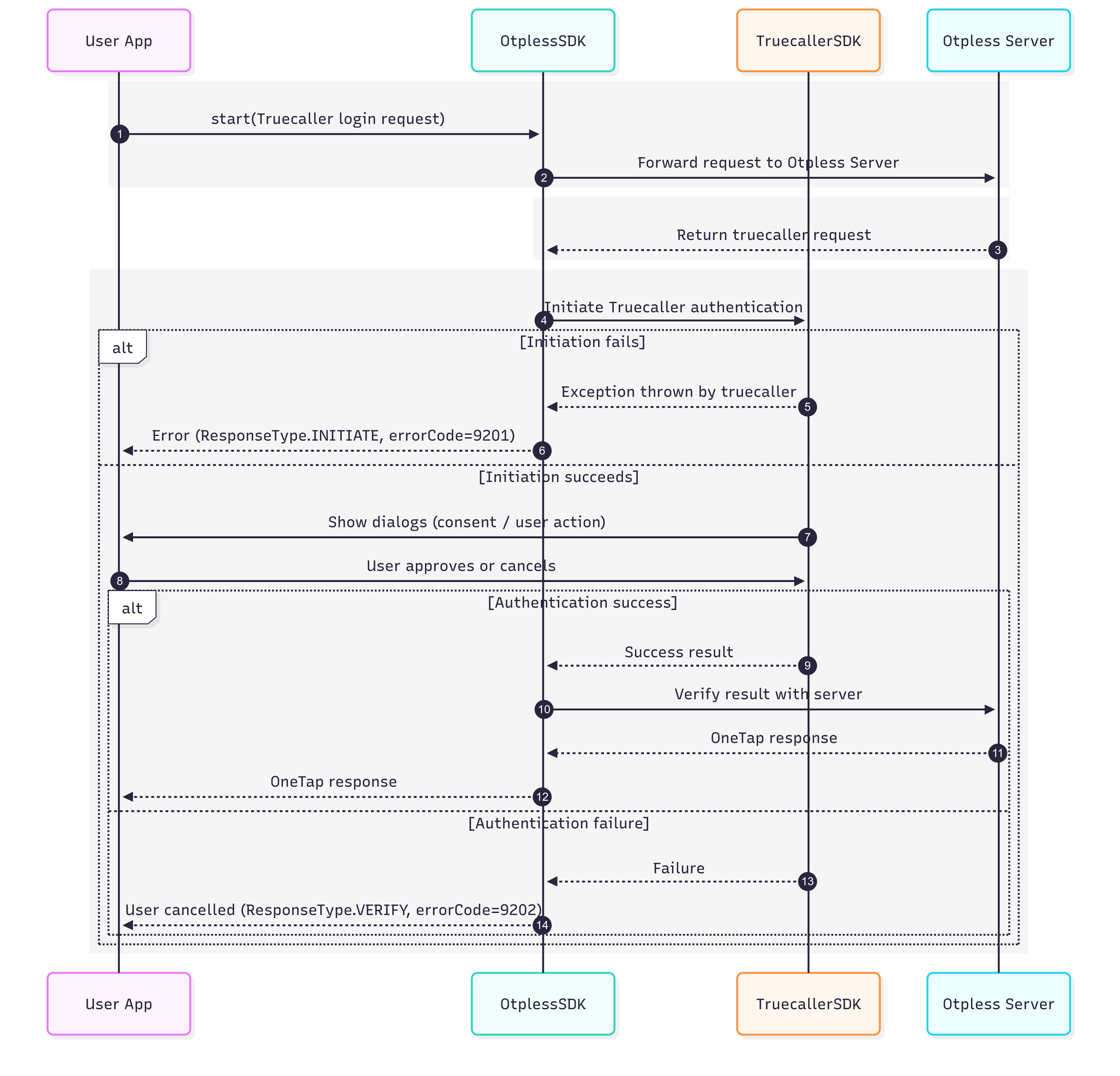
# Truecaller Native Authentication Flow